


Water Level Indicator (Water Tank) using Ultrasonic Sensor (HC-SR04) for ESP8266, ESP32, Raspberry Pi Pico W for Alexa
In this part, we’ll guide you on building a Water Level Indicator (also known as Water Tank Indicator) using a Ultrasonic Sensor that can be connected to either an ESP32, ESP8266, or Raspberry Pi Pico W. Once it’s set up, you’ll be able to measure water levels using Amazon Alexa, ask Alexa for information about it, and also monitor it through the Sinric Pro app and receive a push notification when water level is low.
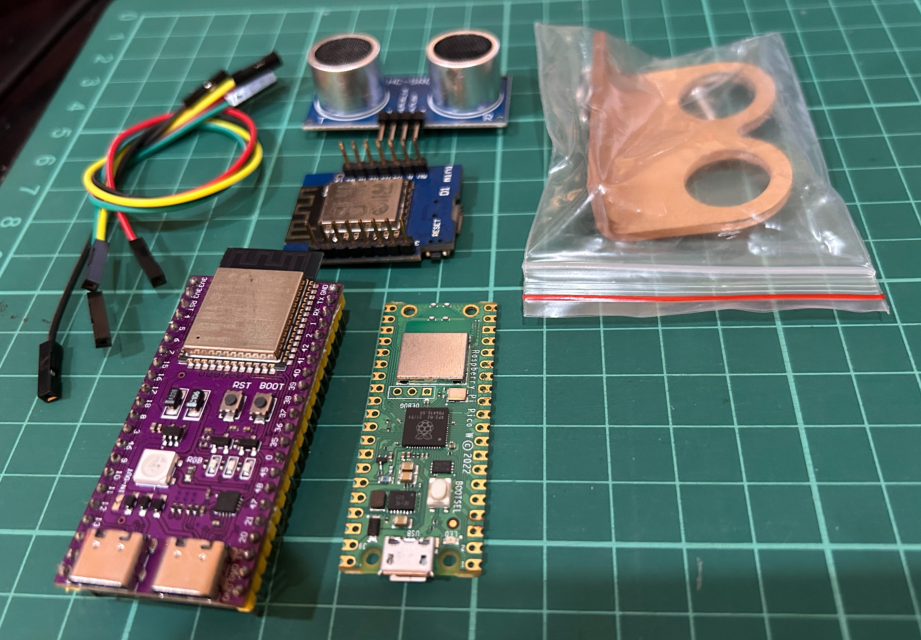
Prerequisites :
- ESP32, ESP8266 or Raspberry Pi Pico W x 1.
- Ultrasonic Sensor (HC-SR04) x 1.
- Plant with a pot x 1.
- Jumper Wires.
Quick introduction to Ultrasonic Sensor
The ultrasonic sensors are low-cost, easy-to-use sensor that can measure distance. It works by sending out a burst of ultrasonic sound and then measuring the time it takes for the echo to return. The distance to the object is then calculated based on the speed of sound.
It is powered by a 5V DC power supply and has four pins: VCC, GND, TRIG, and ECHO. Once the sensor is connected, you can use it to measure distance by sending a pulse to the TRIG pin and then measuring the time it takes for the ECHO pin to go high. The distance to the object can then be calculated using the following formula:
distance = (time * speed of sound) / 2
where:
distanceis in centimeters.timeis in microseconds.speed of soundis 343 meters per second.
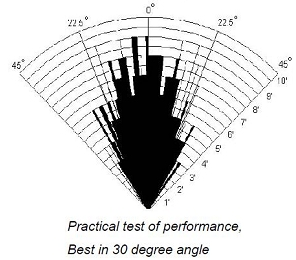
According to the manufacturer notes, the HC-SR04 sensor works best between 2cm – 400 cm (1” - 13ft) within a 30 degree cone.
Wiring Ultrasonic Sensor
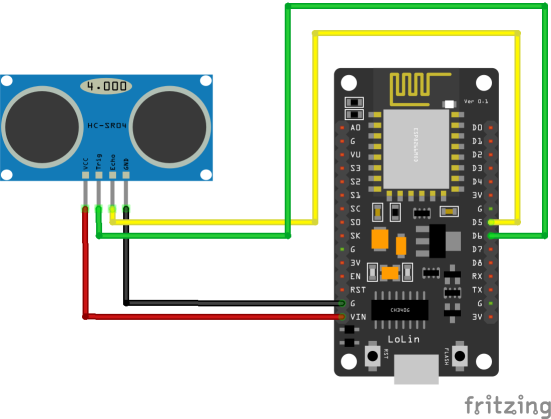
| HC-SR04 Pin | ESP8266 | ESP32 | Pico W |
|---|---|---|---|
| VCC | 5V | 5V | 5V |
| GND | GND | GND | GND |
| TRIG | 12 (D6) | GPIO 5 | 15 |
| ECHO | 14 (D5) | GPIO 18 | 14 |
Let’s verify that sensor is wired correctly and working.
#if defined(ESP8266)
  const int trigPin = 12;
  const int echoPin = 14;
#elif defined(ESP32)
  const int trigPin = 5;
  const int echoPin = 18;
#elif defined(ARDUINO_ARCH_RP2040)
  const int trigPin = 15;
  const int echoPin = 14;
#endif

long duration;
float distanceInCm;

void setup() {
  Serial.begin(115200);
  pinMode(trigPin, OUTPUT);
  pinMode(echoPin, INPUT);
}

void loop() {
  // Clears the trigPin
  digitalWrite(trigPin, LOW);
  delayMicroseconds(2);
  digitalWrite(trigPin, HIGH);
  delayMicroseconds(10);
  digitalWrite(trigPin, LOW);

  duration = pulseIn(echoPin, HIGH);

  // convert duration to CM
  distanceInCm = duration/29 / 2;

  // inches
  // distanceInInches = duration / 74 / 2;

  Serial.print("Distance (cm): ");
  Serial.println(distanceInCm);

  delay(1000);
}
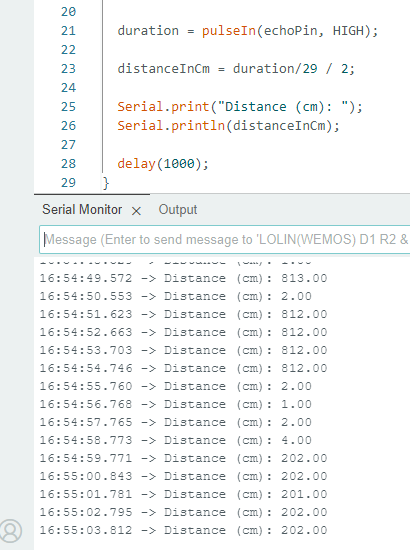
Let’s try measuring the water level as a precentage.
#if defined(ESP8266)
  const int trigPin = 12;
  const int echoPin = 14;
#elif defined(ESP32)
  const int trigPin = 5;
  const int echoPin = 18;
#elif defined(ARDUINO_ARCH_RP2040)
  const int trigPin = 15;
  const int echoPin = 14;
#endif

long duration;
float distanceInCm;
int waterLevelAsPer;

const int EMPTY_TANK_HEIGHT = 150; // Height when the tank is empty
const int FULL_TANK_HEIGHT  =  25; // Height when the tank is full

void setup() {
  Serial.begin(115200);
  pinMode(trigPin, OUTPUT);
  pinMode(echoPin, INPUT);
}

void loop() {
  // Clears the trigPin
  digitalWrite(trigPin, LOW);
  delayMicroseconds(2);
  digitalWrite(trigPin, HIGH);
  delayMicroseconds(10);
  digitalWrite(trigPin, LOW);

  duration = pulseIn(echoPin, HIGH);   // Take a measurement
  distanceInCm = duration/29 / 2; // Convert to CM
  waterLevelAsPer = map((int)distanceInCm ,EMPTY_TANK_HEIGHT, FULL_TANK_HEIGHT, 0, 100); // Convert to precentage value based on tank height

  // In inches ?
  // distanceInInches = duration / 74 / 2;

  Serial.print("As a precentage: ");
  Serial.println(waterLevelAsPer);

  delay(1000);
}
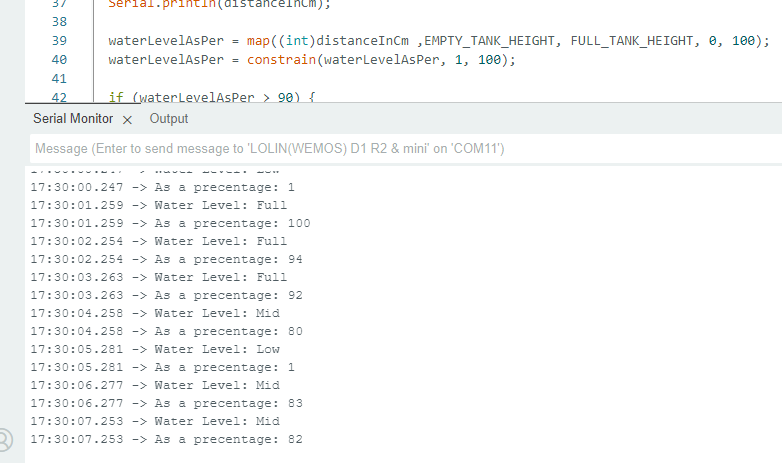
Step 1 : Connect to Sinric Pro
Step 1.1 : Creating a custom device type for Water Level Indicator.
Sinric Pro does not have a built-in device type for Water Level Indicator so we are going to create a custom device type to support showing Water Level Indicator using Device Template feature.
Note: You can use the device template import feature mentioned below to skip creating the full template.
-
Login to your Sinric Pro account and goto Device Templates
-
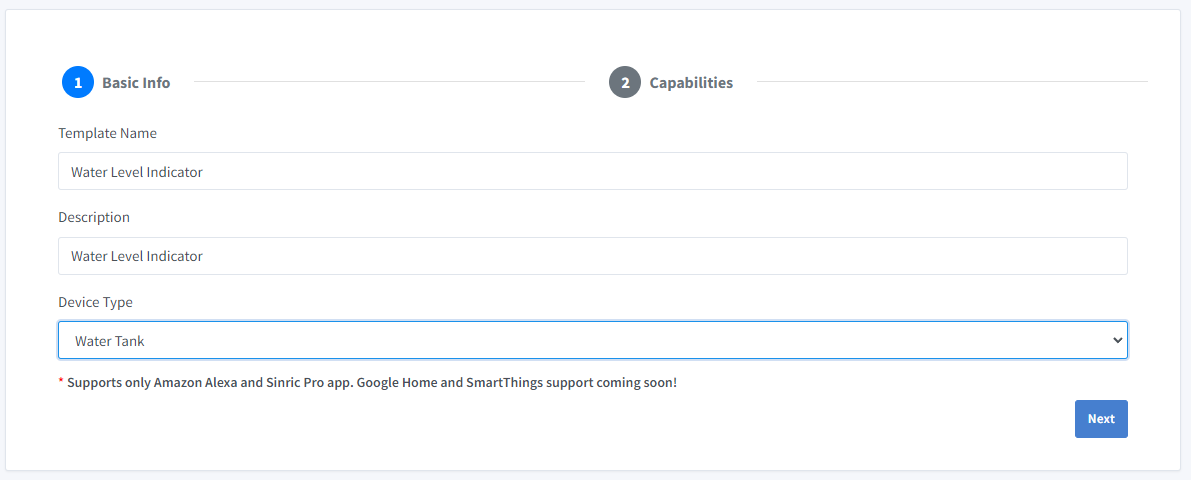
Click Add Device Template. Enter name and description as Water Level Indicator and select Water Tank as device type
- Click Capabilities.
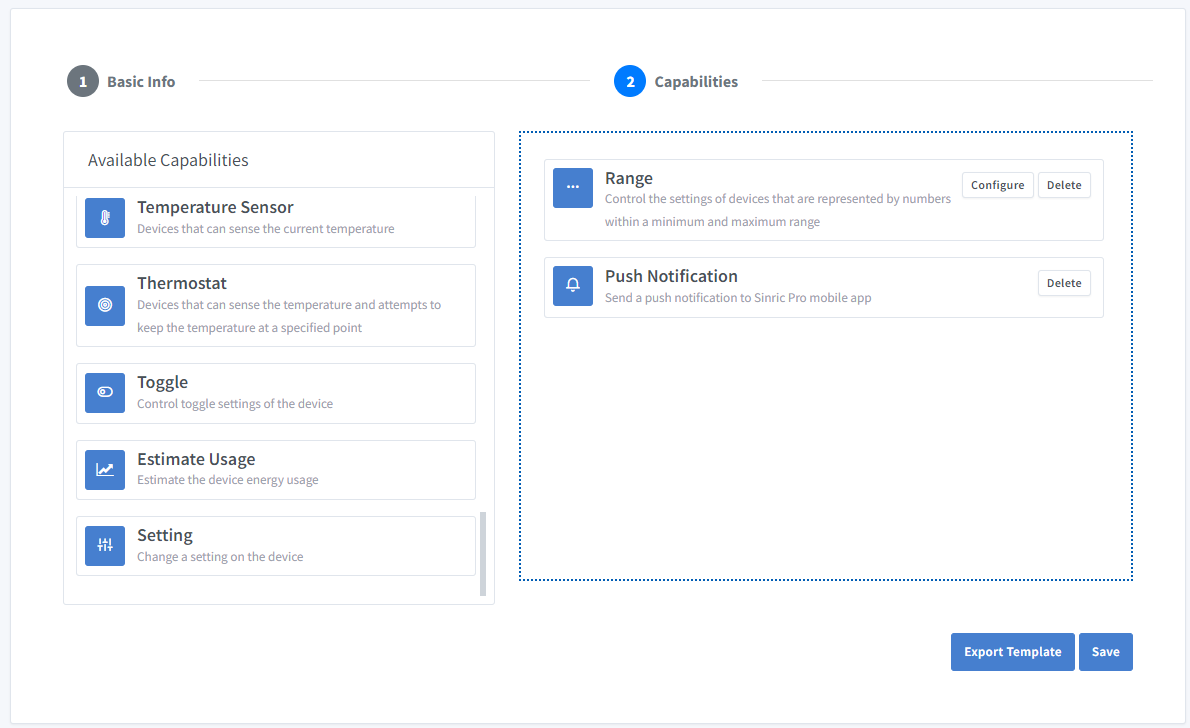
Here we must select the features of our Sensor. We want to know the Water level as a precentage. So let’s drag a Range and Push Notification capability.
-
What’s Range capability?
Range capability can be use to represents a number. eg: current speed of a blender.
-
What’s Push Notification capability?
Notification capability provides the ability to send a push notification message from the code.
Click on Configure button and setup the two capabilities like below.
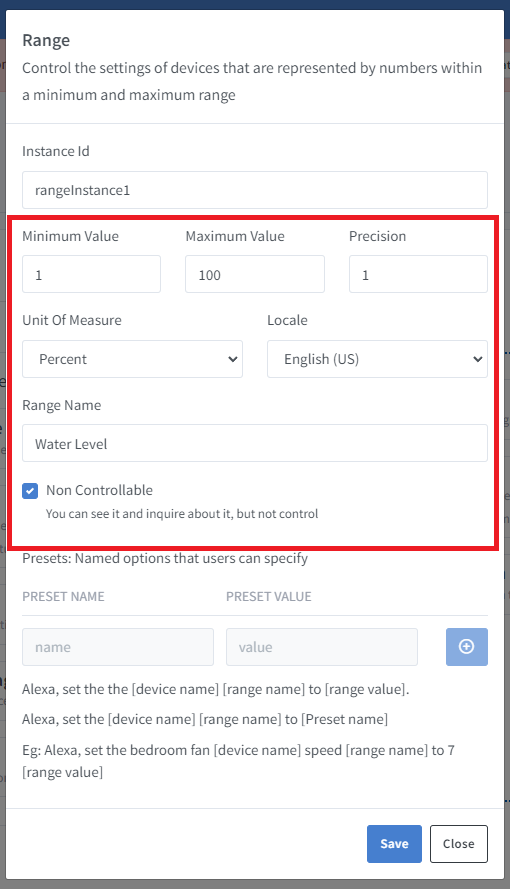
Click on Save to save.
Click on Save to save the template.
Now you can see the template we just created.
Import an existing template?
If you are feeling lazy, you can use the import feature.
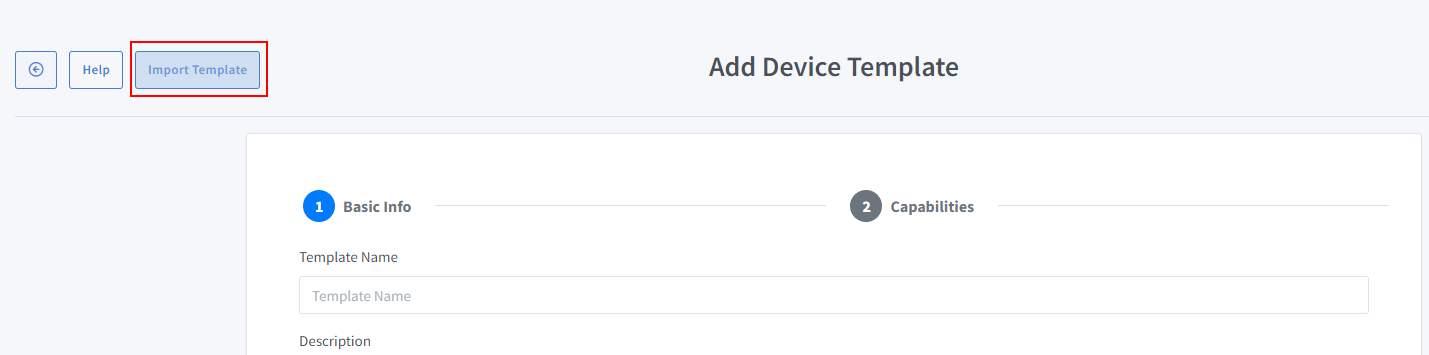
Paste this Template:
{
  "name": "Water Level Indicator",
  "description": "Water Level Indicator",
  "deviceTypeId": "621b9648f728ec974aac62f2",
  "capabilities": [
    {
      "id": "5ff0b45f994fd31b7d5e89c2",
      "range": {
        "instanceId": "rangeInstance1",
        "locale": "en-US",
        "rangeName": "Water Level",
        "minimumValue": 1,
        "maximumValue": 100,
        "precision": 1,
        "unitOfMeasure": "5ffbeefbfaa11451974c6bbd",
        "presets": [],
        "nonControllable": true
      }
    },
    {
      "id": "62a707bd9e2f39090569e2d3"
    }
  ]
}
-
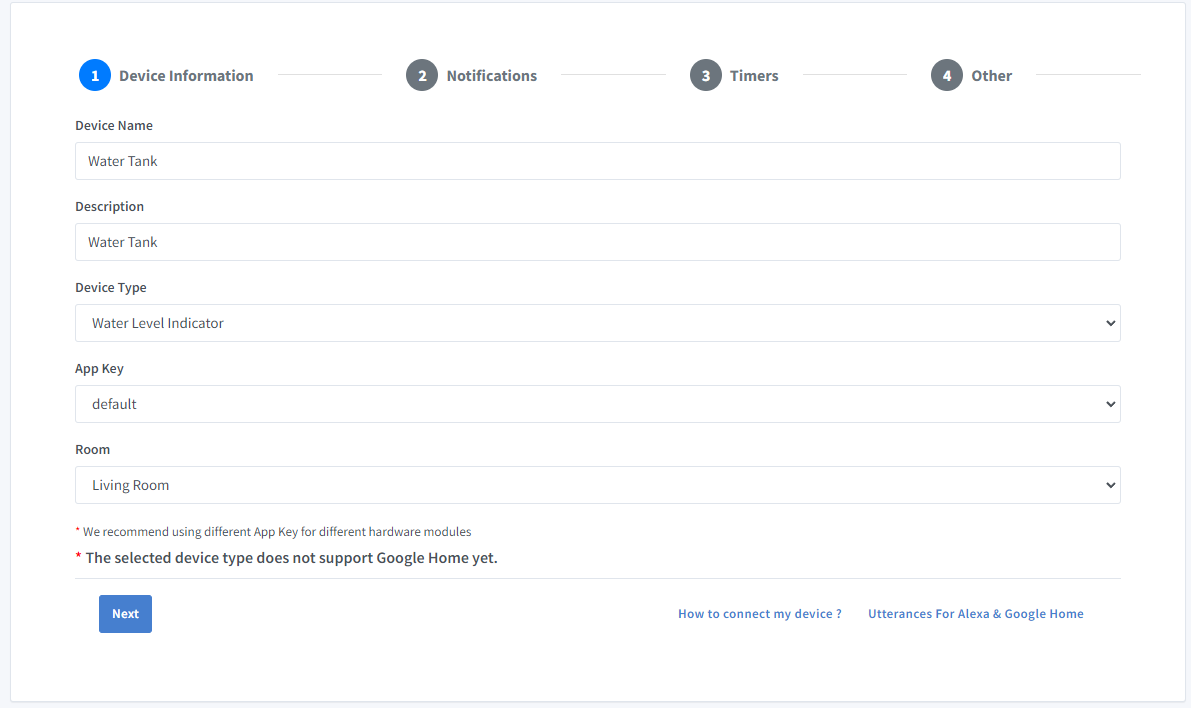
Go to Devices menu on your left and click Add Device button (On top left).
-
Enter the device name Water Tank, description Water Tank and select the device type as Water Level Indicator.
-
Click Others tab and Click Save
-
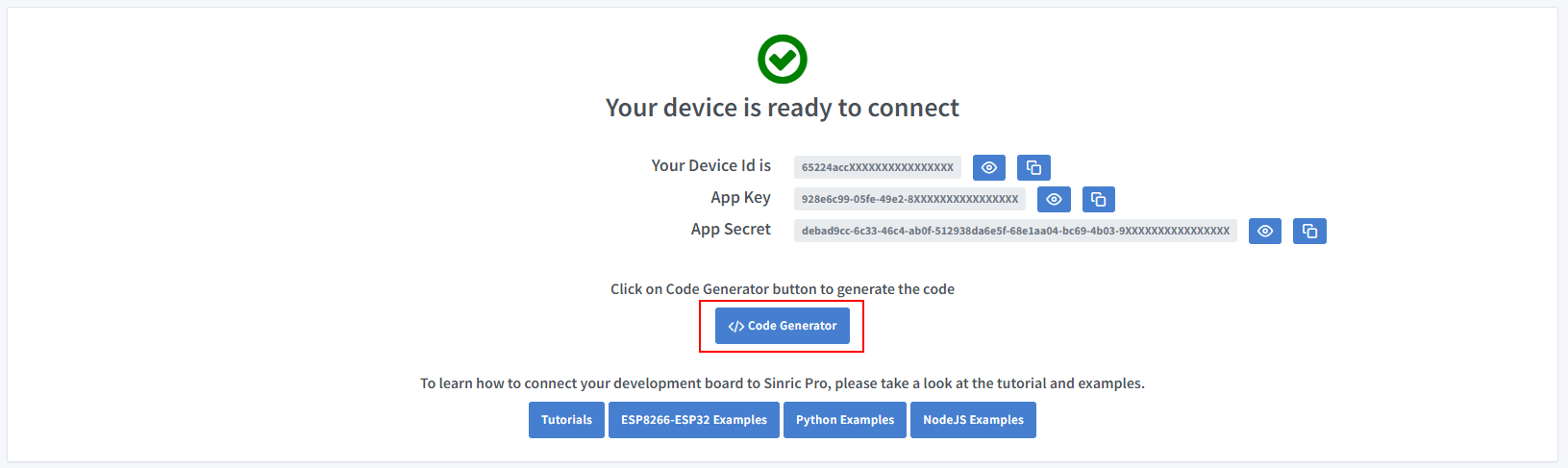
Next screen will show the credentials required to connect the device you just created.
-
Copy the Device Id, App Key and App Secret Keep these values secure. DO NOT SHARE THEM ON PUBLIC FORUMS !
-
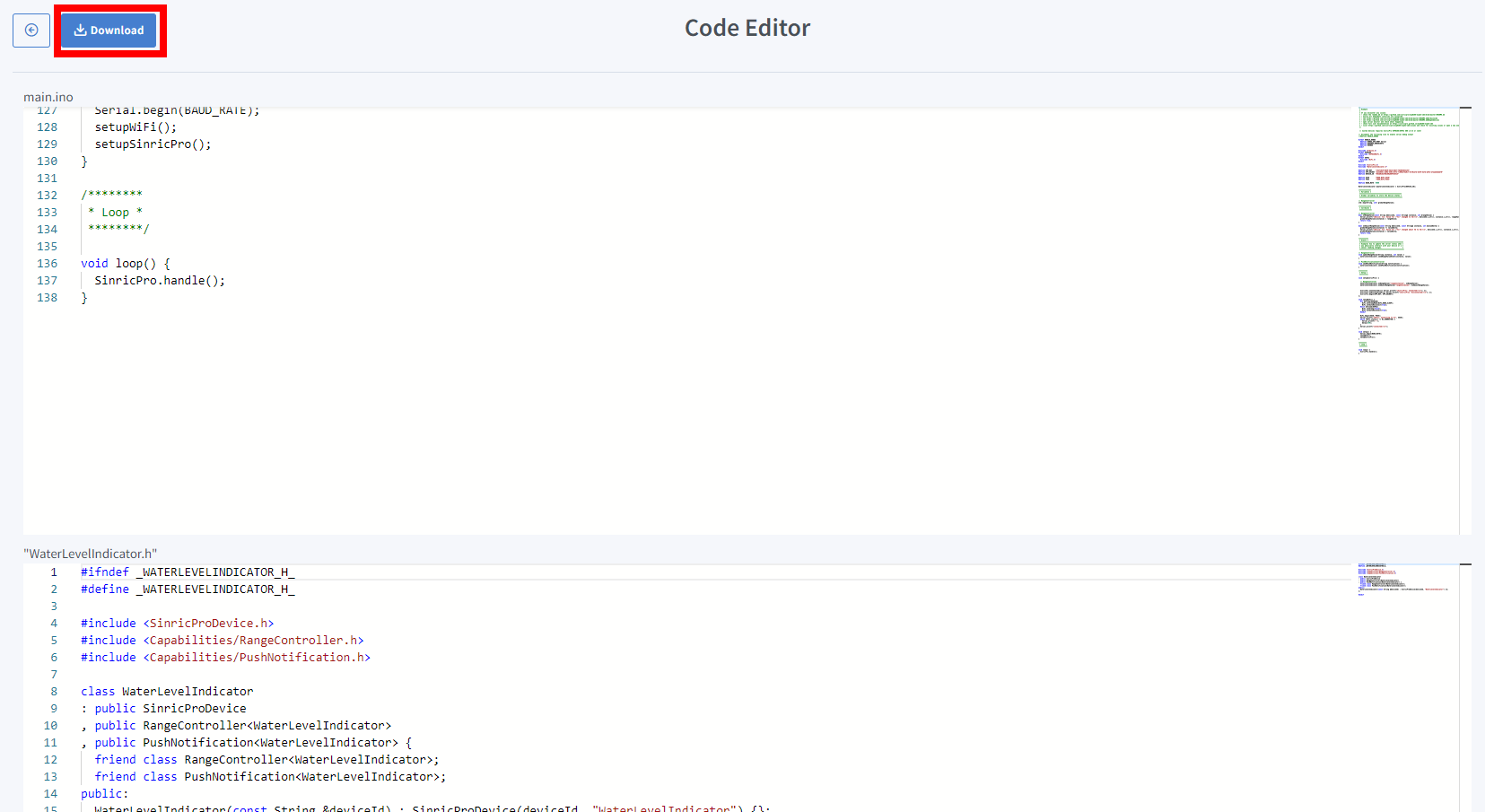
Click on Code Generator to Generate the code. Click on Download to download the code.
Step 2 : Connect to Sinric Pro
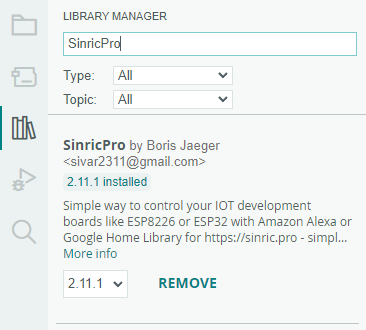
Step 2.1 Install Sinric Pro Library
2.2 Complete Code
sinricpro-water-level-monitor.ino
//#define ENABLE_DEBUG

#ifdef ENABLE_DEBUG
  #define DEBUG_ESP_PORT Serial
  #define NODEBUG_WEBSOCKETS
  #define NDEBUG
#endif

#include <Arduino.h>
#ifdef ESP8266
  #include <ESP8266WiFi.h>
#endif
#ifdef ESP32
  #include <WiFi.h>
#endif

#include <SinricPro.h>
#include "WaterLevelIndicator.h"

// Grab it from https://portal.sinric.pro.
#define APP_KEY    "" //Should look like "de0bxxxx-1x3x-4x3x-ax2x-5dabxxxxxxxx"
#define APP_SECRET "" //Should look like "5f36xxxx-x3x7-4x3x-xexe-e86724a9xxxx-4c4axxxx-3x3x-x5xe-x9x3-333d65xxxxxx"
#define DEVICE_ID  "" //Should look like "6534xxxxxxxc08c6ea1b"

#define SSID       "" // Your WiFi SSID
#define PASS       "" // Your WiFi Password

#define BAUD_RATE  115200
#define EVENT_WAIT_TIME   60000 // send event every 60 seconds

#if defined(ESP8266)
  const int trigPin = 12;
  const int echoPin = 14;
#elif defined(ESP32)
  const int trigPin = 5;
  const int echoPin = 18;
#elif defined(ARDUINO_ARCH_RP2040)
  const int trigPin = 15;
  const int echoPin = 14;
#endif

const int EMPTY_TANK_HEIGHT = 150; // Height when the tank is empty
const int FULL_TANK_HEIGHT  =  25; // Height when the tank is full

WaterLevelIndicator &waterLevelIndicator = SinricPro[DEVICE_ID];

long duration;
float distanceInCm;
int waterLevelAsPer;
int lastWaterLevelAsPer;
float lastDistanceInCm;

// RangeController
void updateRangeValue(int value) {
  waterLevelIndicator.sendRangeValueEvent("rangeInstance1", value);
}

// PushNotificationController
void sendPushNotification(String notification) {
  waterLevelIndicator.sendPushNotification(notification);
}

void handleSensor() {
   if (SinricPro.isConnected() == false) {
    return;
  }

  static unsigned long last_millis;
  unsigned long        current_millis = millis();
  if (last_millis && current_millis - last_millis < EVENT_WAIT_TIME) return; // Wait untill 1 min
  last_millis = current_millis;

  digitalWrite(trigPin, LOW);
  delayMicroseconds(2);
  digitalWrite(trigPin, HIGH);
  delayMicroseconds(10);
  digitalWrite(trigPin, LOW);

  duration = pulseIn(echoPin, HIGH);
  distanceInCm = duration/29 / 2;

  if(distanceInCm <= 0) {
    Serial.printf("Invalid reading: %f..\r\n", distanceInCm);
    return;
  }

  if(lastDistanceInCm == distanceInCm) {
    Serial.printf("Water level did not changed. do nothing...!\r\n");
    return;
  }

  int change = abs(lastDistanceInCm - distanceInCm);
  if(change < 2) {
    Serial.println("Too small change in water level (waves?). Ignore...");
    return;
  }

  lastDistanceInCm = distanceInCm;
  waterLevelAsPer = map((int)distanceInCm ,EMPTY_TANK_HEIGHT, FULL_TANK_HEIGHT, 0, 100);
  waterLevelAsPer = constrain(waterLevelAsPer, 1, 100);

  Serial.printf("Distance (cm): %f. %d%%\r\n", distanceInCm, waterLevelAsPer);

  /* Update water level on server */
  updateRangeValue(waterLevelAsPer);

  /* Send a push notification if the water level is too low! */
  if(waterLevelAsPer < 5) {
    sendPushNotification("Water level is too low!");
  }
}


/*********
 * Setup *
 *********/

void setupSensor() {
  pinMode(trigPin, OUTPUT);
  pinMode(echoPin, INPUT);
}

void setupSinricPro() {
  SinricPro.onConnected([]{ Serial.printf("[SinricPro]: Connected\r\n"); });
  SinricPro.onDisconnected([]{ Serial.printf("[SinricPro]: Disconnected\r\n"); });
  SinricPro.begin(APP_KEY, APP_SECRET);
}

void setupWiFi() {
  #if defined(ESP8266)
    WiFi.setSleepMode(WIFI_NONE_SLEEP);
    WiFi.setAutoReconnect(true);
  #elif defined(ESP32)
    WiFi.setSleep(false);
    WiFi.setAutoReconnect(true);
  #endif

  WiFi.begin(SSID, PASS);
  Serial.printf("[WiFi]: Connecting to %s", SSID);
  while (WiFi.status() != WL_CONNECTED) {
    Serial.printf(".");
    delay(250);
  }
  Serial.printf("connected\r\n");
}

void setup() {
  Serial.begin(BAUD_RATE);
  setupSensor();
  setupWiFi();
  setupSinricPro();
}

/********
 * Loop *
 ********/

void loop() {
  handleSensor();
  SinricPro.handle();
}
WaterLevelIndicator.h
#ifndef _WATERLEVELINDICATOR_H_
#define _WATERLEVELINDICATOR_H_

#include <SinricProDevice.h>
#include <Capabilities/RangeController.h>
#include <Capabilities/PushNotification.h>

class WaterLevelIndicator
: public SinricProDevice
, public RangeController<WaterLevelIndicator>
, public PushNotification<WaterLevelIndicator> {
  friend class RangeController<WaterLevelIndicator>;
  friend class PushNotification<WaterLevelIndicator>;
public:
  WaterLevelIndicator(const String &deviceId) : SinricProDevice(deviceId, "WaterLevelIndicator") {};
};

#endif
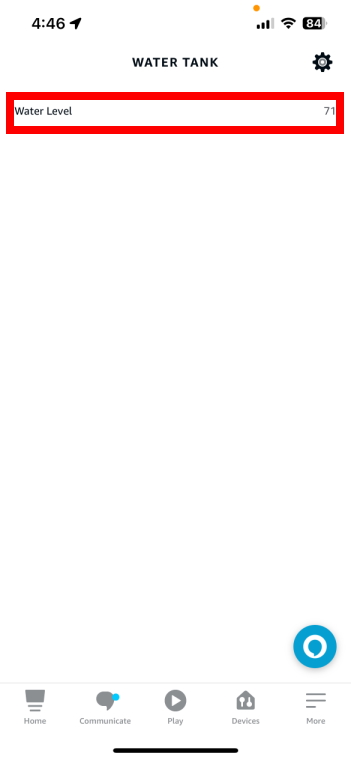
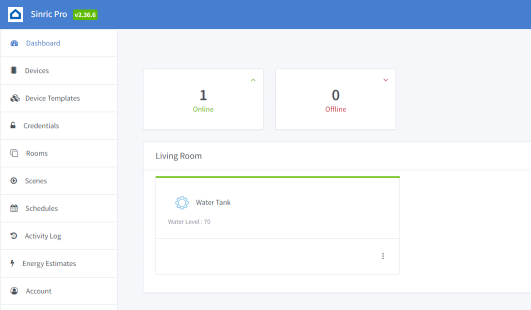
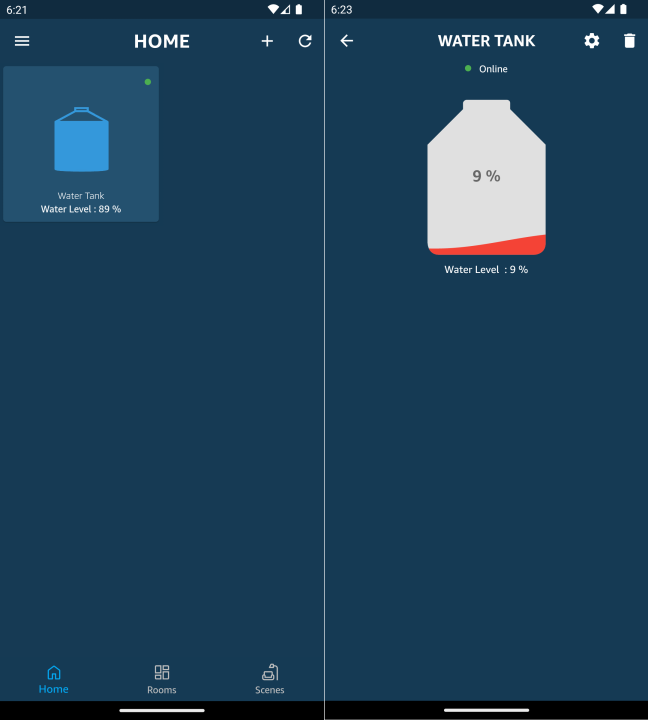
Now you should be able to see the tank water level via Alexa, Sinric Pro App
Alexa, What’s the water level(range name) in water tank(device name)
Step 3 : Making the Full and Empty Tank heights configurable via UI
3.1 Update device template
In order to set the tank full and empty height configurable via UI, we need to go back to the custom device template and add two more Range Controllers for Full Tank Height and Empty Tank Height like below.
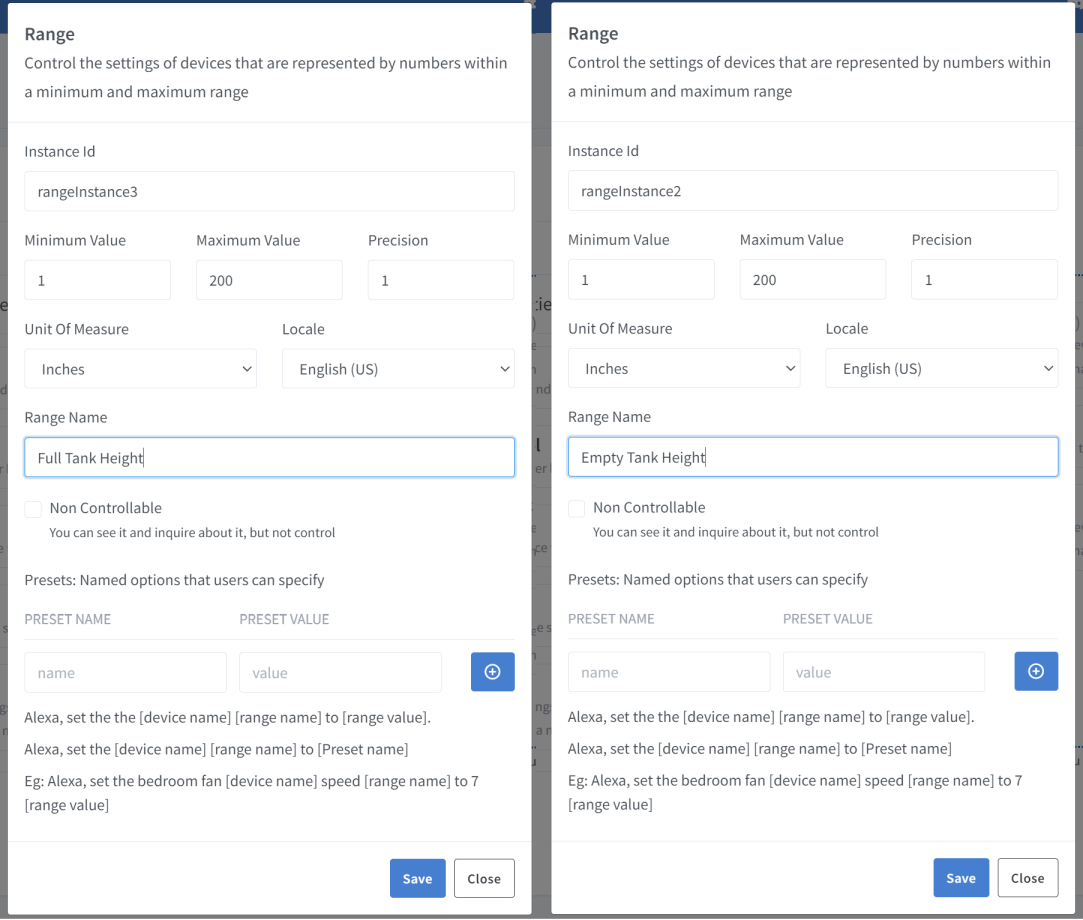
Full device template would look like this
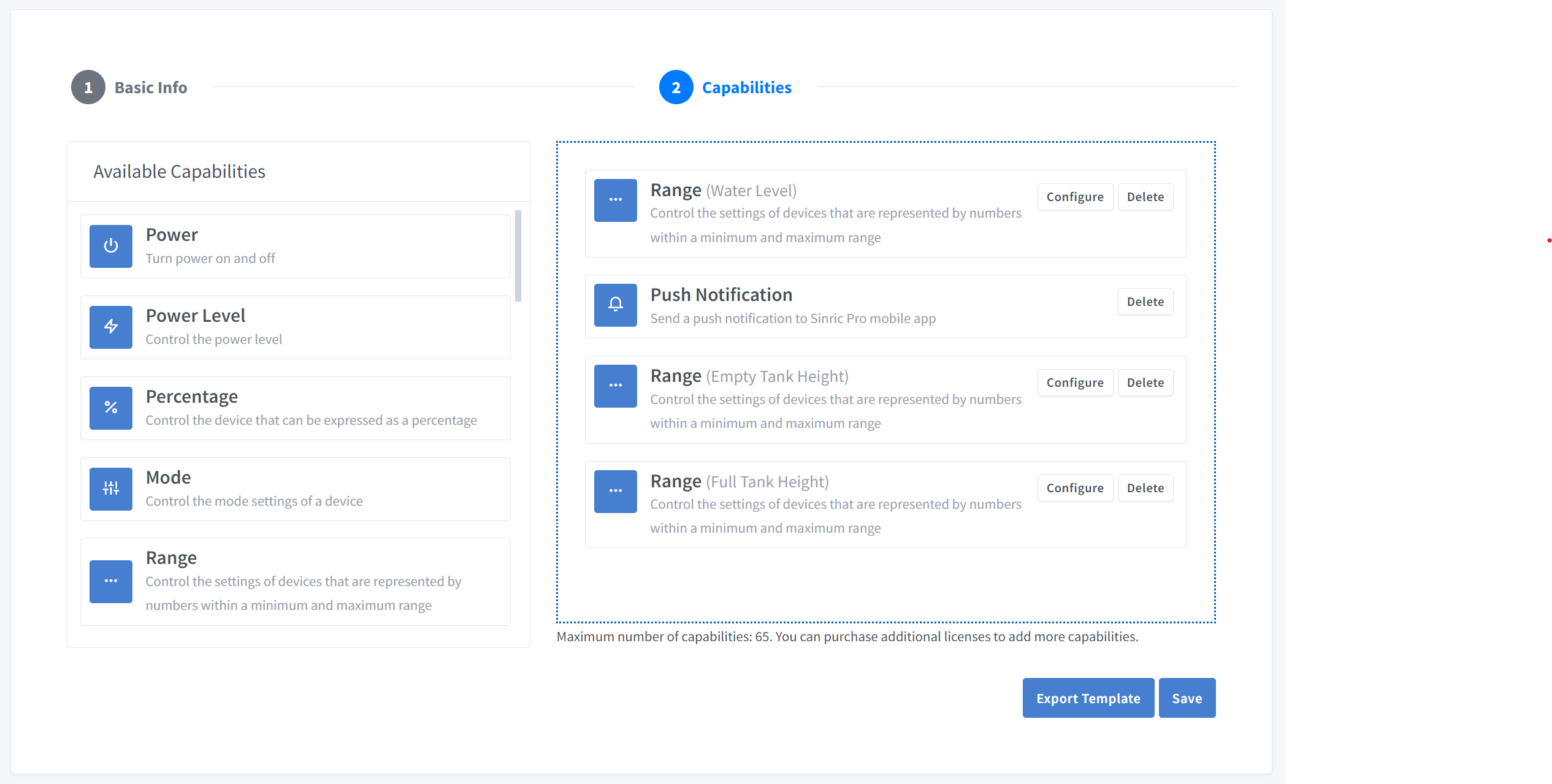
Here’s the template with full and empty heights. You can import this in the Device Template section.
{
  "name": "Water Level Indicator",
  "description": "Water Level Indicator",
  "deviceTypeId": "621b9648f728ec974aac62f2",
  "capabilities": [
    {
      "id": "5ff0b45f994fd31b7d5e89c2",
      "range": {
        "instanceId": "rangeInstance1",
        "locale": "en-US",
        "rangeName": "Water Level",
        "minimumValue": 1,
        "maximumValue": 100,
        "precision": 1,
        "unitOfMeasure": "5ffbeefbfaa11451974c6bbd",
        "presets": [],
        "nonControllable": true
      }
    },
    {
      "id": "62a707bd9e2f39090569e2d3"
    },
    {
      "id": "5ff0b45f994fd31b7d5e89c2",
      "range": {
        "instanceId": "rangeInstance2",
        "locale": "en-US",
        "rangeName": "Empty Tank Height",
        "minimumValue": 1,
        "maximumValue": 200,
        "precision": 1,
        "unitOfMeasure": "600e7937a7a09c3f3230f8ed",
        "presets": [],
        "nonControllable": false
      }
    },
    {
      "id": "5ff0b45f994fd31b7d5e89c2",
      "range": {
        "instanceId": "rangeInstance3",
        "locale": "en-US",
        "rangeName": "Full Tank Height",
        "minimumValue": 1,
        "maximumValue": 200,
        "precision": 1,
        "unitOfMeasure": "600e7937a7a09c3f3230f8ed",
        "presets": [],
        "nonControllable": false
      }
    }
  ]
}
3.2 Complete Code
//#define ENABLE_DEBUG

#ifdef ENABLE_DEBUG
  #define DEBUG_ESP_PORT Serial
  #define NODEBUG_WEBSOCKETS
  #define NDEBUG
#endif

#include <Arduino.h>
#ifdef ESP8266
  #include <ESP8266WiFi.h>
#endif
#ifdef ESP32
  #include <WiFi.h>
#endif

#include <SinricPro.h>
#include "WaterLevelIndicator.h"

// Grab it from https://portal.sinric.pro.
#define APP_KEY    "" //Should look like "de0bxxxx-1x3x-4x3x-ax2x-5dabxxxxxxxx"
#define APP_SECRET "" //Should look like "5f36xxxx-x3x7-4x3x-xexe-e86724a9xxxx-4c4axxxx-3x3x-x5xe-x9x3-333d65xxxxxx"
#define DEVICE_ID  "" //Should look like "6534xxxxxxxc08c6ea1b"

#define SSID       "" // Your WiFi SSID
#define PASS       "" // Your WiFi Password

#define BAUD_RATE  115200
#define EVENT_WAIT_TIME   60000 // send event every 60 seconds

#if defined(ESP8266)
  const int trigPin = 12;
  const int echoPin = 14;
#elif defined(ESP32)
  const int trigPin = 5;
  const int echoPin = 18;
#elif defined(ARDUINO_ARCH_RP2040)
  const int trigPin = 15;
  const int echoPin = 14;
#endif

int EMPTY_TANK_HEIGHT = 150; // Variable for height when the tank is empty
int FULL_TANK_HEIGHT  =  25; // Variable for height when the tank is full

WaterLevelIndicator &waterLevelIndicator = SinricPro[DEVICE_ID];

long duration;
float distanceInCm;
int waterLevelAsPer;
int lastWaterLevelAsPer;
float lastDistanceInCm;

// RangeController
void updateRangeValue(int value) {
  waterLevelIndicator.sendRangeValueEvent("rangeInstance1", value);
}

// PushNotificationController
void sendPushNotification(String notification) {
  waterLevelIndicator.sendPushNotification(notification);
}

// RangeController

// Below function will trigger when you change the sliders
bool onRangeValue(const String &deviceId, const String& instance, int &rangeValue) {
  if(instance == "rangeInstance2") {
    EMPTY_TANK_HEIGHT = rangeValue;
    Serial.printf("Empty tank height changed to %d\r\n", rangeValue);
  } else if(instance == "rangeInstance3") {
    FULL_TANK_HEIGHT = rangeValue;
    Serial.printf("Full tank height changed to %d\r\n", rangeValue);
  }

  return true;
}

bool onAdjustRangeValue(const String &deviceId, const String& instance, int &valueDelta) {
  if(instance == "rangeInstance2") {
    EMPTY_TANK_HEIGHT += valueDelta;
    Serial.printf("Empty tank height adjusted by %d\r\n", valueDelta);
  } else if(instance == "rangeInstance3") {
    FULL_TANK_HEIGHT += valueDelta;
    Serial.printf("Full tank height adjusted by %d\r\n", valueDelta);
  }

  return true;
}

void handleSensor() {
   if (SinricPro.isConnected() == false) {
    return;
  }

  static unsigned long last_millis;
  unsigned long        current_millis = millis();
  if (last_millis && current_millis - last_millis < EVENT_WAIT_TIME) return; // Wait untill 1 min
  last_millis = current_millis;

  digitalWrite(trigPin, LOW);
  delayMicroseconds(2);
  digitalWrite(trigPin, HIGH);
  delayMicroseconds(10);
  digitalWrite(trigPin, LOW);

  duration = pulseIn(echoPin, HIGH);
  distanceInCm = duration/29 / 2;

  if(distanceInCm <= 0) {
    Serial.printf("Invalid reading: %f..\r\n", distanceInCm);
    return;
  }

  if(lastDistanceInCm == distanceInCm) {
    Serial.printf("Water level did not changed. do nothing...!\r\n");
    return;
  }

  int change = abs(lastDistanceInCm - distanceInCm);
  if(change < 2) {
    Serial.println("Too small change in water level (waves?). Ignore...");
    return;
  }

  lastDistanceInCm = distanceInCm;
  waterLevelAsPer = map((int)distanceInCm ,EMPTY_TANK_HEIGHT, FULL_TANK_HEIGHT, 0, 100);
  waterLevelAsPer = constrain(waterLevelAsPer, 1, 100);

  Serial.printf("Distance (cm): %f. %d%%\r\n", distanceInCm, waterLevelAsPer);

  /* Update water level on server */
  updateRangeValue(waterLevelAsPer);

  /* Send a push notification if the water level is too low! */
  if(waterLevelAsPer < 5) {
    sendPushNotification("Water level is too low!");
  }
}


/*********
 * Setup *
 *********/

void setupSensor() {
  pinMode(trigPin, OUTPUT);
  pinMode(echoPin, INPUT);
}

void setupSinricPro() {
  // RangeController

  // setup Empty tank slider
  waterLevelIndicator.onRangeValue("rangeInstance2", onRangeValue);
  waterLevelIndicator.onAdjustRangeValue("rangeInstance2", onAdjustRangeValue);

  // Setup Full tank slider.
  waterLevelIndicator.onRangeValue("rangeInstance3", onRangeValue);
  waterLevelIndicator.onAdjustRangeValue("rangeInstance3", onAdjustRangeValue);

  SinricPro.onConnected([]{ Serial.printf("[SinricPro]: Connected\r\n"); });
  SinricPro.onDisconnected([]{ Serial.printf("[SinricPro]: Disconnected\r\n"); });
  SinricPro.begin(APP_KEY, APP_SECRET);
}

void setupWiFi() {
  #if defined(ESP8266)
    WiFi.setSleepMode(WIFI_NONE_SLEEP);
    WiFi.setAutoReconnect(true);
  #elif defined(ESP32)
    WiFi.setSleep(false);
    WiFi.setAutoReconnect(true);
  #endif

  WiFi.begin(SSID, PASS);
  Serial.printf("[WiFi]: Connecting to %s", SSID);
  while (WiFi.status() != WL_CONNECTED) {
    Serial.printf(".");
    delay(250);
  }
  Serial.printf("connected\r\n");
}

void setup() {
  Serial.begin(BAUD_RATE);
  setupSensor();
  setupWiFi();
  setupSinricPro();
}

/********
 * Loop *
 ********/

void loop() {
  handleSensor();
  SinricPro.handle();
}
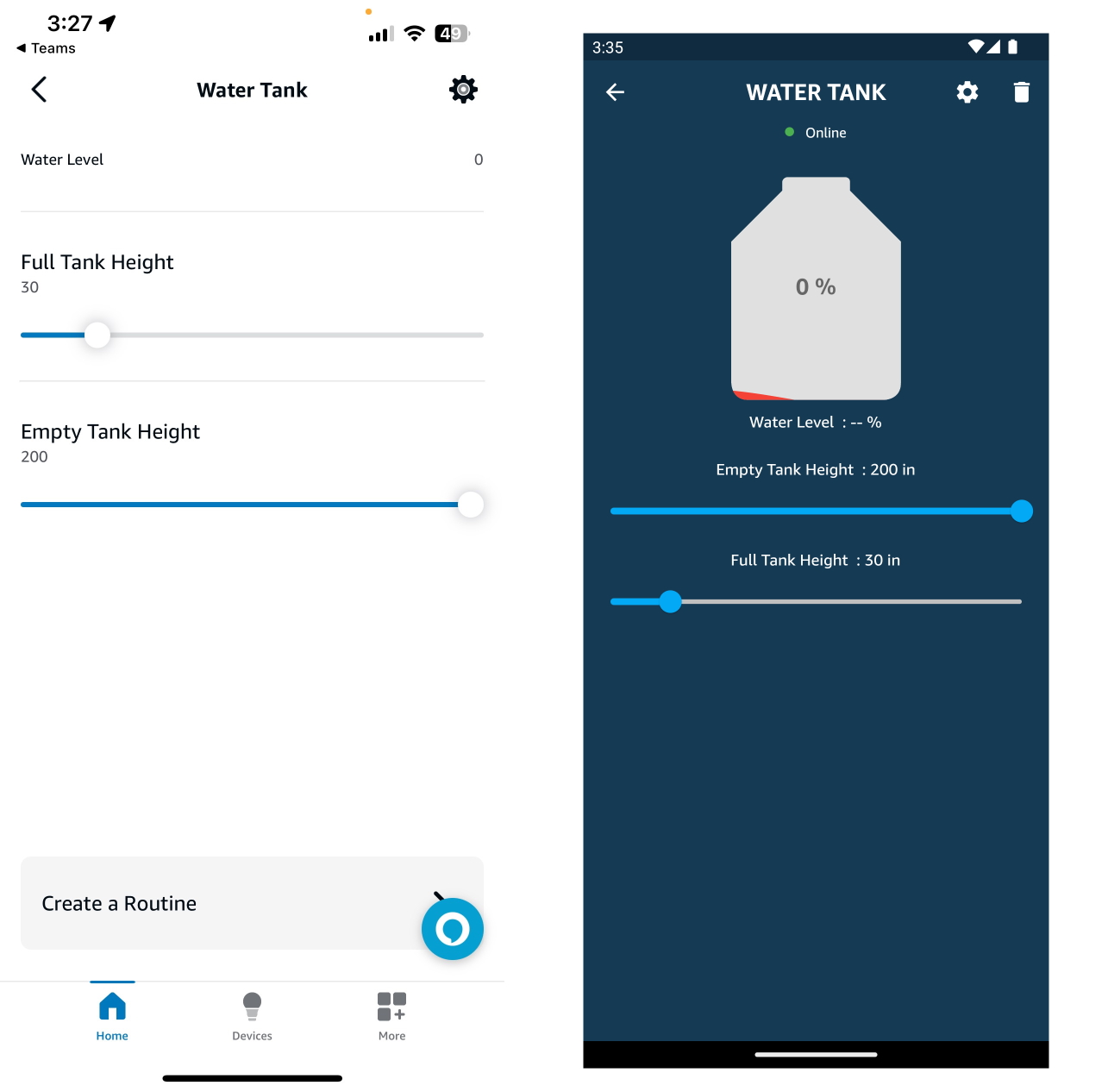
That’s It.
Troubleshooting
-
Google Home or SmartThings are not Supported.
-
Please refer to our Troubleshooting page for more details.
Related tutorials
- How to control an ESP32 or ESP8266 with Alexa and Google Home
- Water leak, flood and rain sensor
- Capacitive soil moisture sensor (HW-390)
This document is open source. See a typo? Please create an issue