


Indicatore di livello dell'acqua (serbatoio) con sensore a ultrasuoni (HC-SR04) per ESP8266, ESP32, Raspberry Pi Pico W e Alexa
In questa parte ti guidiamo nella costruzione di un indicatore di livello dell’acqua (detto anche indicatore per serbatoi) con un sensore a ultrasuoni collegabile a un ESP32, ESP8266 o Raspberry Pi Pico W. Una volta configurato, potrai misurare il livello dell’acqua con Amazon Alexa, chiedere informazioni ad Alexa, tenerlo sotto controllo dall’app Sinric Pro e ricevere una notifica push quando il livello dell’acqua è basso.
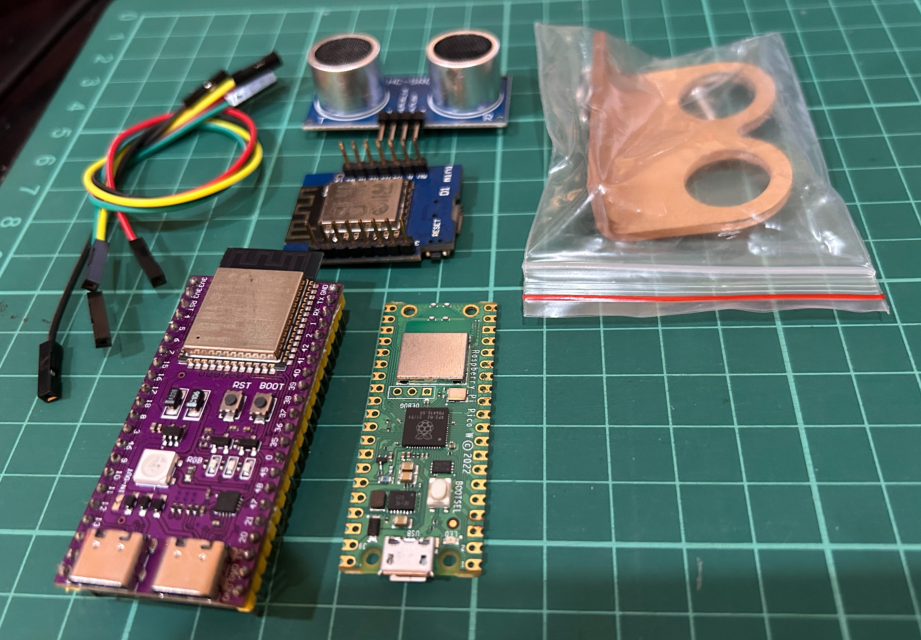
Prerequisiti :
- ESP32, ESP8266 o Raspberry Pi Pico W x 1.
- Sensore a ultrasuoni (HC-SR04) x 1.
- Pianta in vaso x 1.
- Cavetti jumper.
Breve introduzione al sensore a ultrasuoni
I sensori a ultrasuoni sono sensori economici e facili da usare, in grado di misurare le distanze. Funzionano emettendo un impulso di ultrasuoni e misurando il tempo che l’eco impiega a tornare. La distanza dall’oggetto viene poi calcolata in base alla velocità del suono.
Il sensore è alimentato a 5V DC e ha quattro pin: VCC, GND, TRIG ed ECHO. Una volta collegato, puoi usarlo per misurare la distanza inviando un impulso al pin TRIG e misurando il tempo che il pin ECHO impiega a passare a livello alto. La distanza dall’oggetto si calcola quindi con la formula seguente:
distance = (time * speed of sound) / 2
dove:
distanceè in centimetri.timeè in microsecondi.speed of soundè 343 metri al secondo.
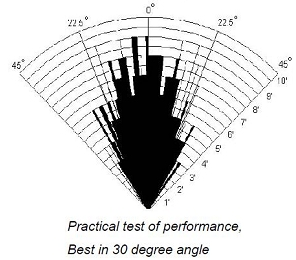
Secondo le note del produttore, il sensore HC-SR04 funziona al meglio tra 2 cm e 400 cm (1” - 13ft) entro un cono di 30 gradi.
Cablaggio del sensore a ultrasuoni
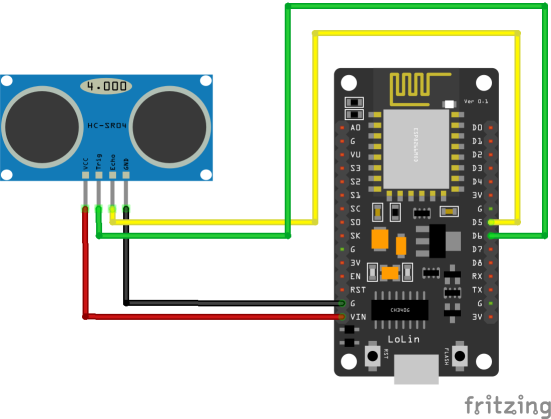
| Pin HC-SR04 | ESP8266 | ESP32 | Pico W |
|---|---|---|---|
| VCC | 5V | 5V | 5V |
| GND | GND | GND | GND |
| TRIG | 12 (D6) | GPIO 5 | 15 |
| ECHO | 14 (D5) | GPIO 18 | 14 |
Verifichiamo che il sensore sia collegato correttamente e funzioni.
#if defined(ESP8266)
  const int trigPin = 12;
  const int echoPin = 14;
#elif defined(ESP32)
  const int trigPin = 5;
  const int echoPin = 18;
#elif defined(ARDUINO_ARCH_RP2040)
  const int trigPin = 15;
  const int echoPin = 14;
#endif

long duration;
float distanceInCm;

void setup() {
  Serial.begin(115200);
  pinMode(trigPin, OUTPUT);
  pinMode(echoPin, INPUT);
}

void loop() {
  // Clears the trigPin
  digitalWrite(trigPin, LOW);
  delayMicroseconds(2);
  digitalWrite(trigPin, HIGH);
  delayMicroseconds(10);
  digitalWrite(trigPin, LOW);

  duration = pulseIn(echoPin, HIGH);

  // convert duration to CM
  distanceInCm = duration/29 / 2;

  // inches
  // distanceInInches = duration / 74 / 2;

  Serial.print("Distance (cm): ");
  Serial.println(distanceInCm);

  delay(1000);
}
Vedi questo codice su GitHub Gist
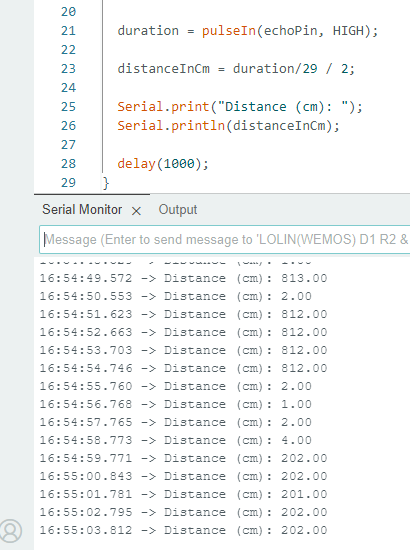
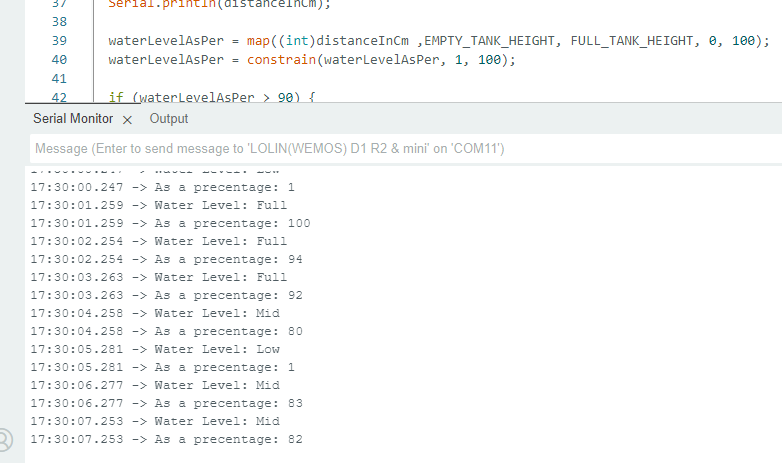
Proviamo ora a misurare il livello dell’acqua in percentuale.
#if defined(ESP8266)
  const int trigPin = 12;
  const int echoPin = 14;
#elif defined(ESP32)
  const int trigPin = 5;
  const int echoPin = 18;
#elif defined(ARDUINO_ARCH_RP2040)
  const int trigPin = 15;
  const int echoPin = 14;
#endif

long duration;
float distanceInCm;
int waterLevelAsPer;

const int EMPTY_TANK_HEIGHT = 150; // Height when the tank is empty
const int FULL_TANK_HEIGHT  =  25; // Height when the tank is full

void setup() {
  Serial.begin(115200);
  pinMode(trigPin, OUTPUT);
  pinMode(echoPin, INPUT);
}

void loop() {
  // Clears the trigPin
  digitalWrite(trigPin, LOW);
  delayMicroseconds(2);
  digitalWrite(trigPin, HIGH);
  delayMicroseconds(10);
  digitalWrite(trigPin, LOW);

  duration = pulseIn(echoPin, HIGH);   // Take a measurement
  distanceInCm = duration/29 / 2; // Convert to CM
  waterLevelAsPer = map((int)distanceInCm ,EMPTY_TANK_HEIGHT, FULL_TANK_HEIGHT, 0, 100); // Convert to precentage value based on tank height

  // In inches ?
  // distanceInInches = duration / 74 / 2;

  Serial.print("As a precentage: ");
  Serial.println(waterLevelAsPer);

  delay(1000);
}
Vedi questo codice su GitHub Gist
Passo 1 : Collegati a Sinric Pro
Passo 1.1 : Creare un tipo di dispositivo personalizzato per l’indicatore di livello dell’acqua.
Sinric Pro non ha un tipo di dispositivo predefinito per l’indicatore di livello dell’acqua, quindi ne creeremo uno personalizzato con la funzione Device Template.
Nota: per evitare di creare l’intero template puoi usare la funzione di importazione dei template di dispositivo descritta più sotto.
-
Accedi al tuo account Sinric Pro e vai su Device Templates
-
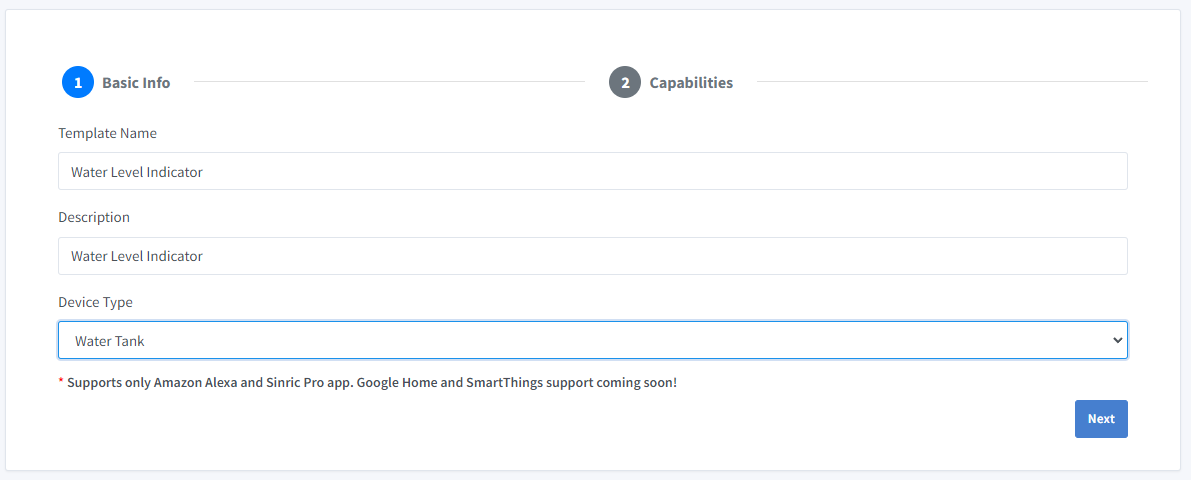
Fai clic su Add Device Template. Inserisci Water Level Indicator come nome e descrizione e seleziona Water Tank come tipo di dispositivo
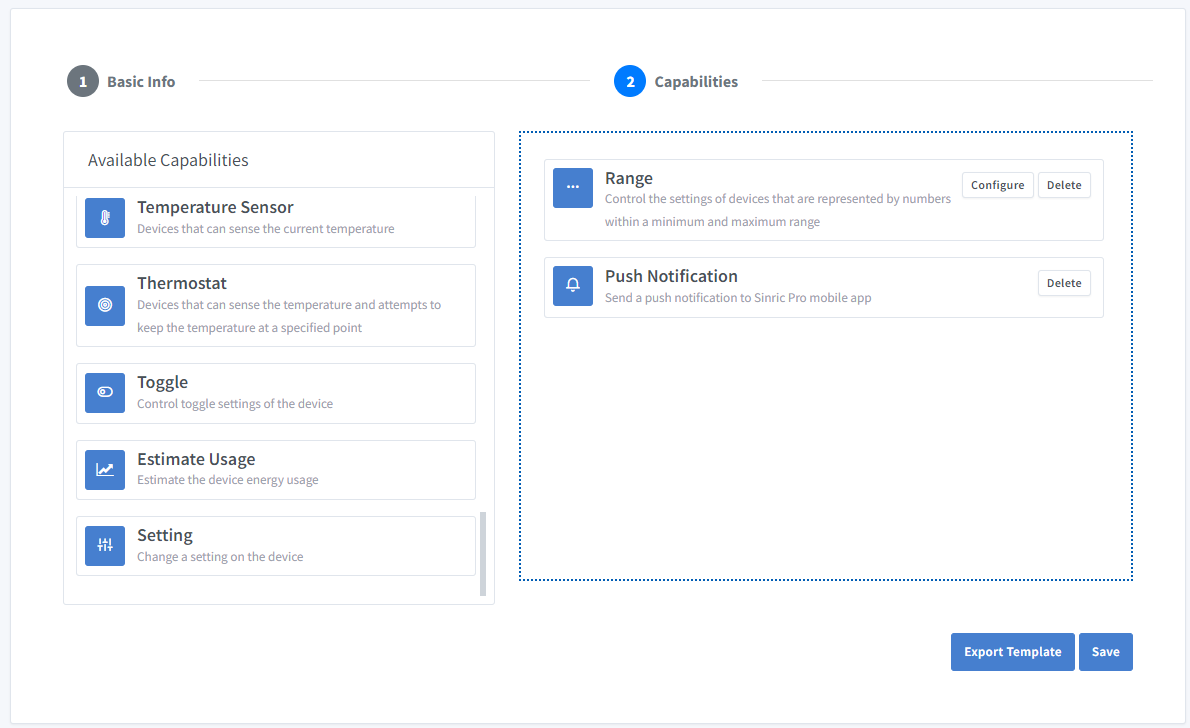
- Fai clic su Capabilities.
Qui dobbiamo scegliere le funzionalità del nostro sensore. Vogliamo conoscere il livello dell’acqua in percentuale, quindi trasciniamo una capability Range e una Push Notification.
-
Che cos’è la capability Range?
La capability Range serve a rappresentare un numero, ad esempio la velocità attuale di un frullatore.
-
Che cos’è la capability Push Notification?
La capability Notification permette di inviare un messaggio di notifica push dal codice.
Fai clic sul pulsante Configure e imposta le due capability come qui sotto.
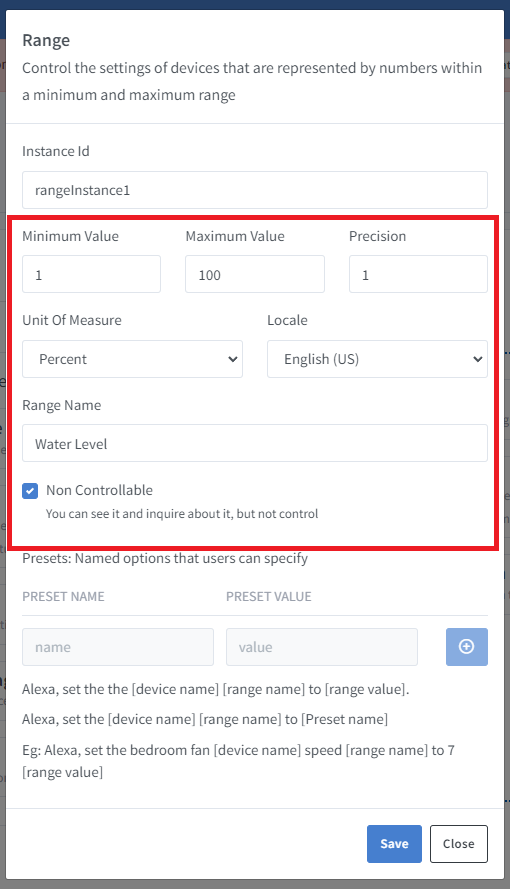
Fai clic su Save per salvare.
Fai clic su Save per salvare il template.
Ora puoi vedere il template appena creato.
Importare un template esistente?
Se non hai voglia di farlo a mano, puoi usare la funzione di importazione.
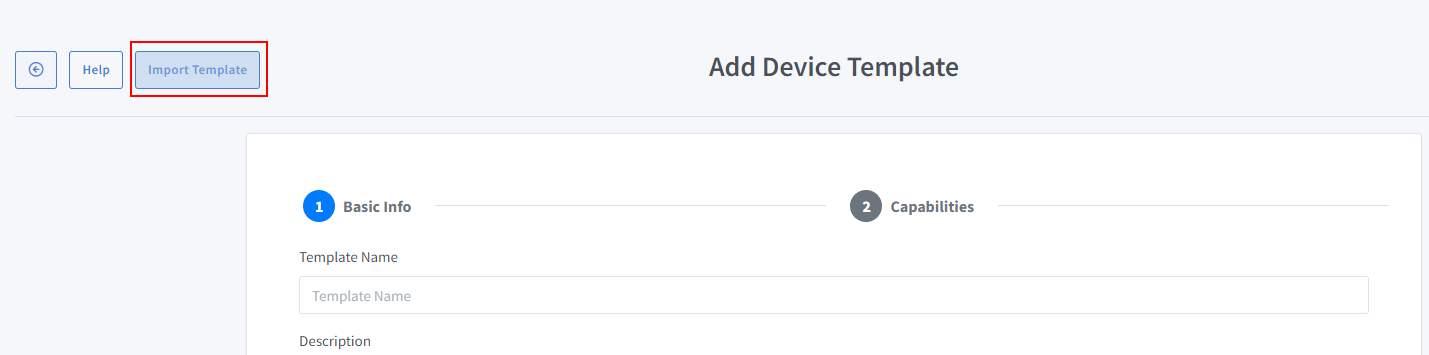
Incolla questo template:
{
  "name": "Water Level Indicator",
  "description": "Water Level Indicator",
  "deviceTypeId": "621b9648f728ec974aac62f2",
  "capabilities": [
    {
      "id": "5ff0b45f994fd31b7d5e89c2",
      "range": {
        "instanceId": "rangeInstance1",
        "locale": "en-US",
        "rangeName": "Water Level",
        "minimumValue": 1,
        "maximumValue": 100,
        "precision": 1,
        "unitOfMeasure": "5ffbeefbfaa11451974c6bbd",
        "presets": [],
        "nonControllable": true
      }
    },
    {
      "id": "62a707bd9e2f39090569e2d3"
    }
  ]
}
Vedi questo codice su GitHub Gist
-
Apri il menu Devices a sinistra e fai clic sul pulsante Add Device (in alto a sinistra).
-
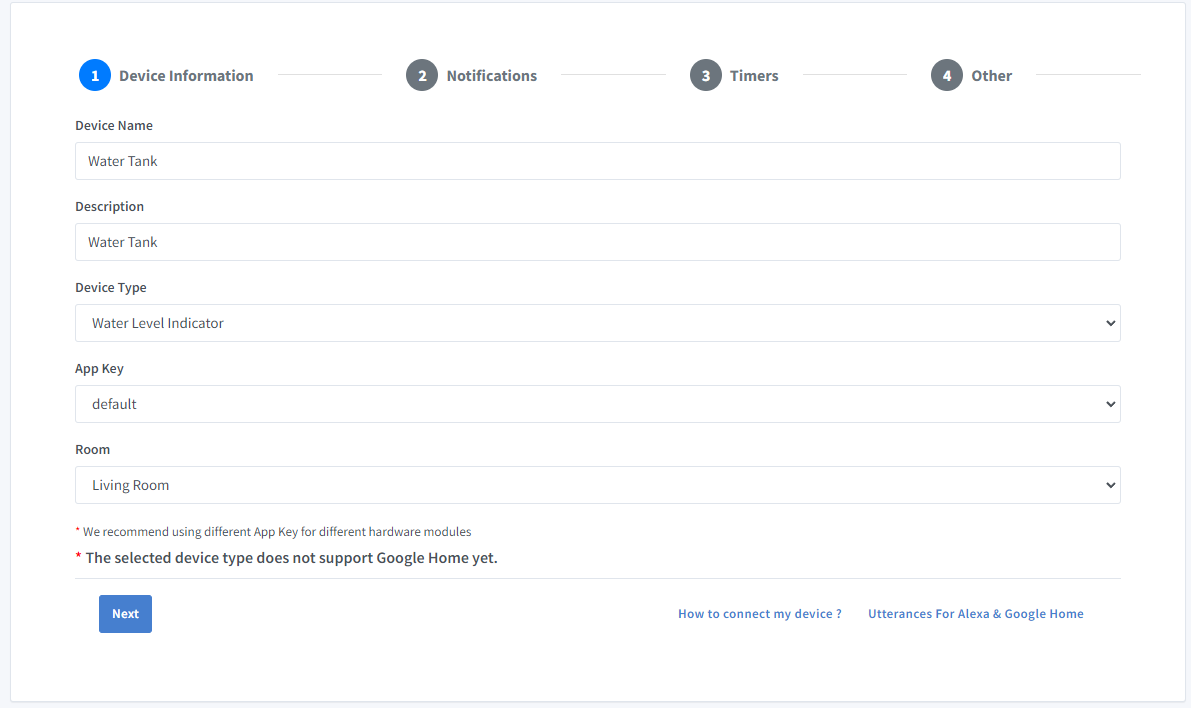
Inserisci il nome del dispositivo Water Tank, la descrizione Water Tank e seleziona il tipo di dispositivo Water Level Indicator.
-
Apri la scheda Others e fai clic su Save
-
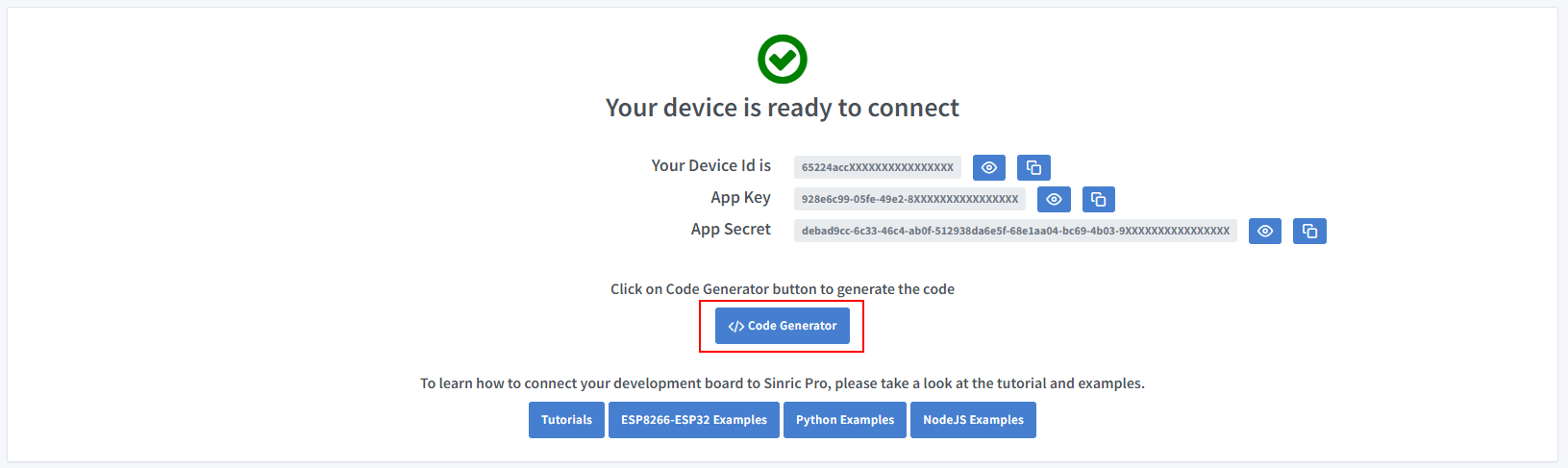
La schermata successiva mostra le credenziali necessarie per collegare il dispositivo appena creato.
-
Copia Device Id, App Key e App Secret Tieni questi valori al sicuro. NON CONDIVIDERLI SU FORUM PUBBLICI !
-
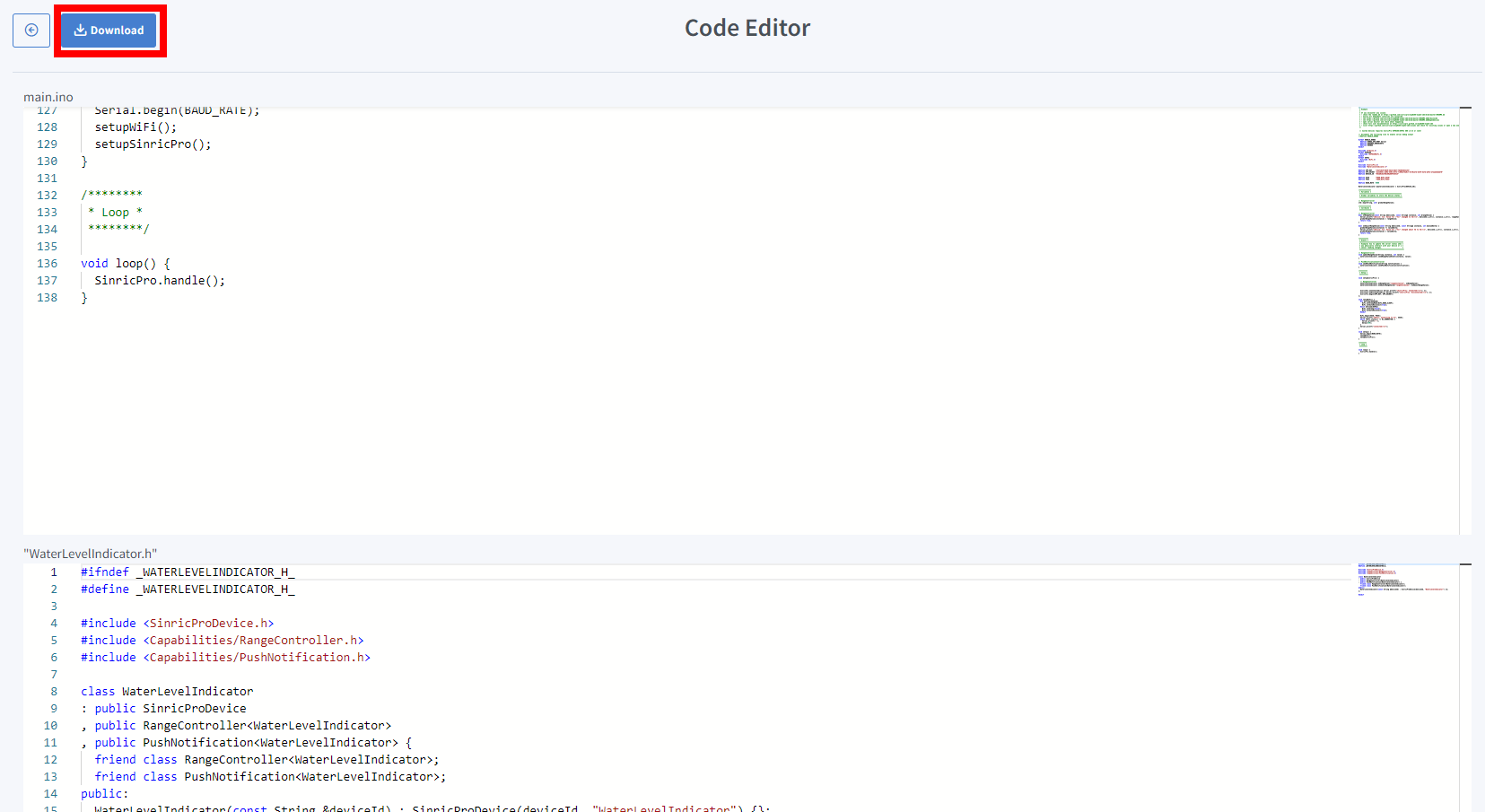
Fai clic su Code Generator per generare il codice. Fai clic su Download per scaricarlo.
Passo 2 : Collegati a Sinric Pro
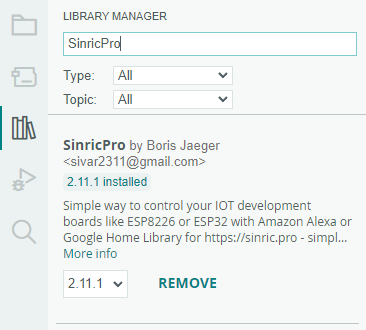
Passo 2.1 Installa la libreria Sinric Pro
2.2 Codice completo
sinricpro-water-level-monitor.ino
//#define ENABLE_DEBUG

#ifdef ENABLE_DEBUG
  #define DEBUG_ESP_PORT Serial
  #define NODEBUG_WEBSOCKETS
  #define NDEBUG
#endif

#include <Arduino.h>
#ifdef ESP8266
  #include <ESP8266WiFi.h>
#endif
#ifdef ESP32
  #include <WiFi.h>
#endif

#include <SinricPro.h>
#include "WaterLevelIndicator.h"

// Grab it from https://portal.sinric.pro.
#define APP_KEY    "" //Should look like "de0bxxxx-1x3x-4x3x-ax2x-5dabxxxxxxxx"
#define APP_SECRET "" //Should look like "5f36xxxx-x3x7-4x3x-xexe-e86724a9xxxx-4c4axxxx-3x3x-x5xe-x9x3-333d65xxxxxx"
#define DEVICE_ID  "" //Should look like "6534xxxxxxxc08c6ea1b"

#define SSID       "" // Your WiFi SSID
#define PASS       "" // Your WiFi Password

#define BAUD_RATE  115200
#define EVENT_WAIT_TIME   60000 // send event every 60 seconds

#if defined(ESP8266)
  const int trigPin = 12;
  const int echoPin = 14;
#elif defined(ESP32)
  const int trigPin = 5;
  const int echoPin = 18;
#elif defined(ARDUINO_ARCH_RP2040)
  const int trigPin = 15;
  const int echoPin = 14;
#endif

const int EMPTY_TANK_HEIGHT = 150; // Height when the tank is empty
const int FULL_TANK_HEIGHT  =  25; // Height when the tank is full

WaterLevelIndicator &waterLevelIndicator = SinricPro[DEVICE_ID];

long duration;
float distanceInCm;
int waterLevelAsPer;
int lastWaterLevelAsPer;
float lastDistanceInCm;

// RangeController
void updateRangeValue(int value) {
  waterLevelIndicator.sendRangeValueEvent("rangeInstance1", value);
}

// PushNotificationController
void sendPushNotification(String notification) {
  waterLevelIndicator.sendPushNotification(notification);
}

void handleSensor() {
   if (SinricPro.isConnected() == false) {
    return;
  }

  static unsigned long last_millis;
  unsigned long        current_millis = millis();
  if (last_millis && current_millis - last_millis < EVENT_WAIT_TIME) return; // Wait untill 1 min
  last_millis = current_millis;

  digitalWrite(trigPin, LOW);
  delayMicroseconds(2);
  digitalWrite(trigPin, HIGH);
  delayMicroseconds(10);
  digitalWrite(trigPin, LOW);

  duration = pulseIn(echoPin, HIGH);
  distanceInCm = duration/29 / 2;

  if(distanceInCm <= 0) {
    Serial.printf("Invalid reading: %f..\r\n", distanceInCm);
    return;
  }

  if(lastDistanceInCm == distanceInCm) {
    Serial.printf("Water level did not changed. do nothing...!\r\n");
    return;
  }

  int change = abs(lastDistanceInCm - distanceInCm);
  if(change < 2) {
    Serial.println("Too small change in water level (waves?). Ignore...");
    return;
  }

  lastDistanceInCm = distanceInCm;
  waterLevelAsPer = map((int)distanceInCm ,EMPTY_TANK_HEIGHT, FULL_TANK_HEIGHT, 0, 100);
  waterLevelAsPer = constrain(waterLevelAsPer, 1, 100);

  Serial.printf("Distance (cm): %f. %d%%\r\n", distanceInCm, waterLevelAsPer);

  /* Update water level on server */
  updateRangeValue(waterLevelAsPer);

  /* Send a push notification if the water level is too low! */
  if(waterLevelAsPer < 5) {
    sendPushNotification("Water level is too low!");
  }
}


/*********
 * Setup *
 *********/

void setupSensor() {
  pinMode(trigPin, OUTPUT);
  pinMode(echoPin, INPUT);
}

void setupSinricPro() {
  SinricPro.onConnected([]{ Serial.printf("[SinricPro]: Connected\r\n"); });
  SinricPro.onDisconnected([]{ Serial.printf("[SinricPro]: Disconnected\r\n"); });
  SinricPro.begin(APP_KEY, APP_SECRET);
}

void setupWiFi() {
  #if defined(ESP8266)
    WiFi.setSleepMode(WIFI_NONE_SLEEP);
    WiFi.setAutoReconnect(true);
  #elif defined(ESP32)
    WiFi.setSleep(false);
    WiFi.setAutoReconnect(true);
  #endif

  WiFi.begin(SSID, PASS);
  Serial.printf("[WiFi]: Connecting to %s", SSID);
  while (WiFi.status() != WL_CONNECTED) {
    Serial.printf(".");
    delay(250);
  }
  Serial.printf("connected\r\n");
}

void setup() {
  Serial.begin(BAUD_RATE);
  setupSensor();
  setupWiFi();
  setupSinricPro();
}

/********
 * Loop *
 ********/

void loop() {
  handleSensor();
  SinricPro.handle();
}
WaterLevelIndicator.h
#ifndef _WATERLEVELINDICATOR_H_
#define _WATERLEVELINDICATOR_H_

#include <SinricProDevice.h>
#include <Capabilities/RangeController.h>
#include <Capabilities/PushNotification.h>

class WaterLevelIndicator
: public SinricProDevice
, public RangeController<WaterLevelIndicator>
, public PushNotification<WaterLevelIndicator> {
  friend class RangeController<WaterLevelIndicator>;
  friend class PushNotification<WaterLevelIndicator>;
public:
  WaterLevelIndicator(const String &deviceId) : SinricProDevice(deviceId, "WaterLevelIndicator") {};
};

#endif
Vedi questo codice su GitHub Gist
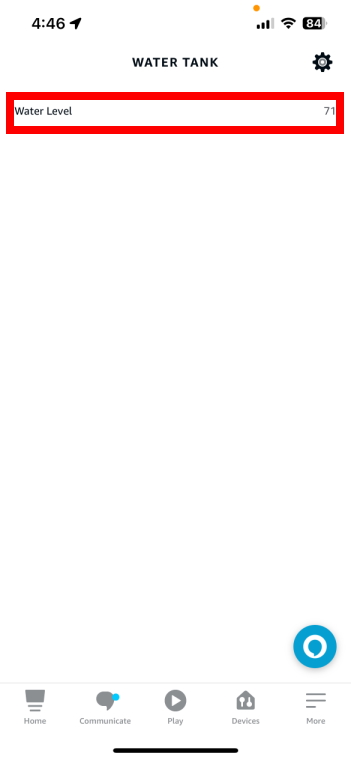
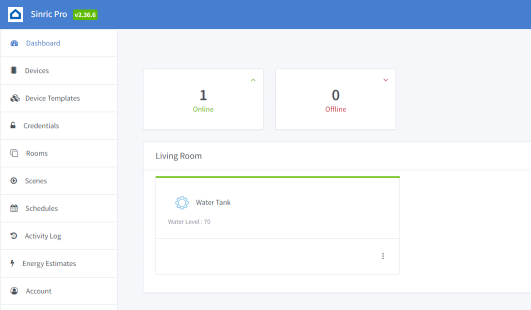
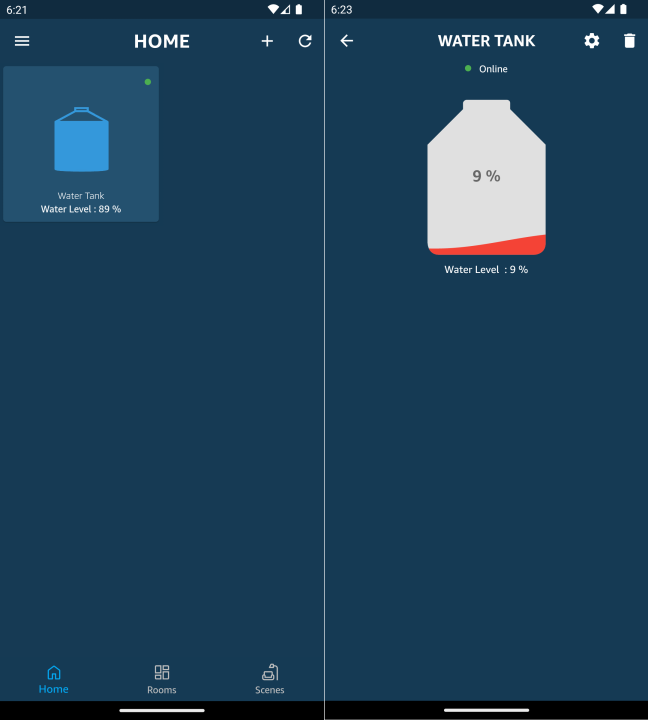
Ora dovresti poter vedere il livello dell’acqua del serbatoio tramite Alexa e l’app Sinric Pro
Alexa, qual è il water level (nome del range) di water tank (nome del dispositivo)
Passo 3 : Rendere configurabili dall’interfaccia le altezze di serbatoio pieno e vuoto
3.1 Aggiorna il template di dispositivo
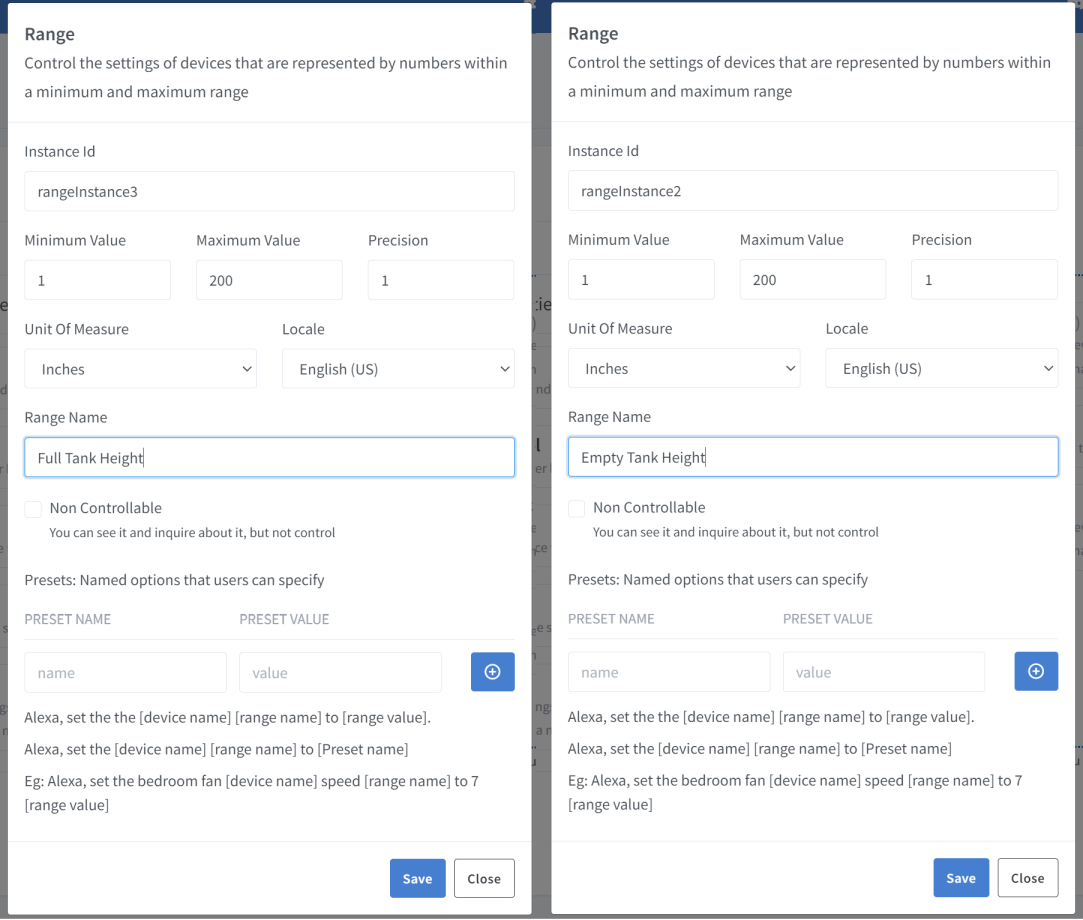
Per rendere configurabili dall’interfaccia le altezze di serbatoio pieno e vuoto, dobbiamo tornare al template di dispositivo personalizzato e aggiungere altri due Range Controller, Full Tank Height ed Empty Tank Height, come qui sotto.
Il template di dispositivo completo si presenta così
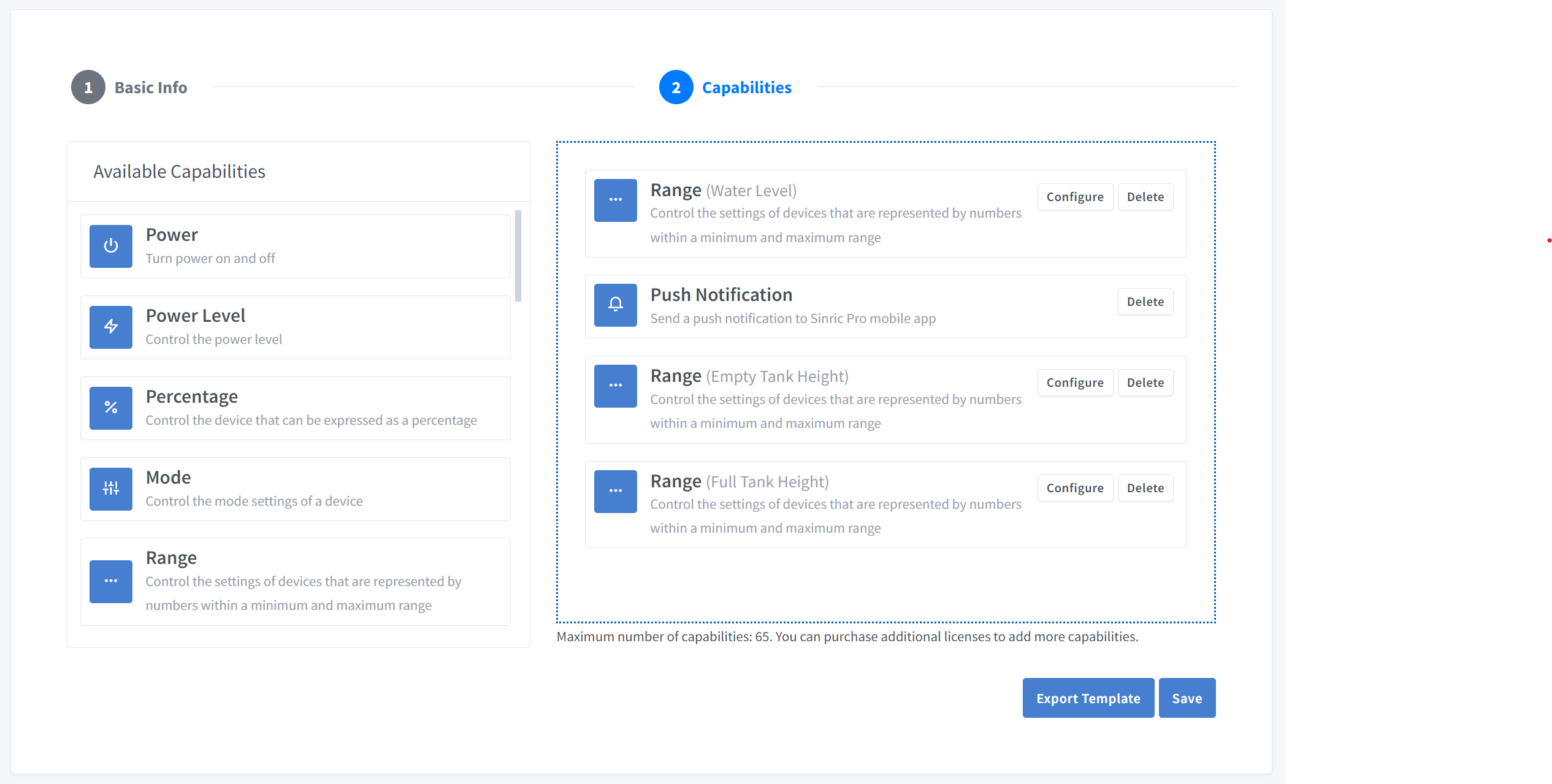
Ecco il template con le altezze di pieno e vuoto. Puoi importarlo nella sezione Device Template.
{
  "name": "Water Level Indicator",
  "description": "Water Level Indicator",
  "deviceTypeId": "621b9648f728ec974aac62f2",
  "capabilities": [
    {
      "id": "5ff0b45f994fd31b7d5e89c2",
      "range": {
        "instanceId": "rangeInstance1",
        "locale": "en-US",
        "rangeName": "Water Level",
        "minimumValue": 1,
        "maximumValue": 100,
        "precision": 1,
        "unitOfMeasure": "5ffbeefbfaa11451974c6bbd",
        "presets": [],
        "nonControllable": true
      }
    },
    {
      "id": "62a707bd9e2f39090569e2d3"
    },
    {
      "id": "5ff0b45f994fd31b7d5e89c2",
      "range": {
        "instanceId": "rangeInstance2",
        "locale": "en-US",
        "rangeName": "Empty Tank Height",
        "minimumValue": 1,
        "maximumValue": 200,
        "precision": 1,
        "unitOfMeasure": "600e7937a7a09c3f3230f8ed",
        "presets": [],
        "nonControllable": false
      }
    },
    {
      "id": "5ff0b45f994fd31b7d5e89c2",
      "range": {
        "instanceId": "rangeInstance3",
        "locale": "en-US",
        "rangeName": "Full Tank Height",
        "minimumValue": 1,
        "maximumValue": 200,
        "precision": 1,
        "unitOfMeasure": "600e7937a7a09c3f3230f8ed",
        "presets": [],
        "nonControllable": false
      }
    }
  ]
}
Vedi questo codice su GitHub Gist
3.2 Codice completo
//#define ENABLE_DEBUG

#ifdef ENABLE_DEBUG
  #define DEBUG_ESP_PORT Serial
  #define NODEBUG_WEBSOCKETS
  #define NDEBUG
#endif

#include <Arduino.h>
#ifdef ESP8266
  #include <ESP8266WiFi.h>
#endif
#ifdef ESP32
  #include <WiFi.h>
#endif

#include <SinricPro.h>
#include "WaterLevelIndicator.h"

// Grab it from https://portal.sinric.pro.
#define APP_KEY    "" //Should look like "de0bxxxx-1x3x-4x3x-ax2x-5dabxxxxxxxx"
#define APP_SECRET "" //Should look like "5f36xxxx-x3x7-4x3x-xexe-e86724a9xxxx-4c4axxxx-3x3x-x5xe-x9x3-333d65xxxxxx"
#define DEVICE_ID  "" //Should look like "6534xxxxxxxc08c6ea1b"

#define SSID       "" // Your WiFi SSID
#define PASS       "" // Your WiFi Password

#define BAUD_RATE  115200
#define EVENT_WAIT_TIME   60000 // send event every 60 seconds

#if defined(ESP8266)
  const int trigPin = 12;
  const int echoPin = 14;
#elif defined(ESP32)
  const int trigPin = 5;
  const int echoPin = 18;
#elif defined(ARDUINO_ARCH_RP2040)
  const int trigPin = 15;
  const int echoPin = 14;
#endif

int EMPTY_TANK_HEIGHT = 150; // Variable for height when the tank is empty
int FULL_TANK_HEIGHT  =  25; // Variable for height when the tank is full

WaterLevelIndicator &waterLevelIndicator = SinricPro[DEVICE_ID];

long duration;
float distanceInCm;
int waterLevelAsPer;
int lastWaterLevelAsPer;
float lastDistanceInCm;

// RangeController
void updateRangeValue(int value) {
  waterLevelIndicator.sendRangeValueEvent("rangeInstance1", value);
}

// PushNotificationController
void sendPushNotification(String notification) {
  waterLevelIndicator.sendPushNotification(notification);
}

// RangeController

// Below function will trigger when you change the sliders
bool onRangeValue(const String &deviceId, const String& instance, int &rangeValue) {
  if(instance == "rangeInstance2") {
    EMPTY_TANK_HEIGHT = rangeValue;
    Serial.printf("Empty tank height changed to %d\r\n", rangeValue);
  } else if(instance == "rangeInstance3") {
    FULL_TANK_HEIGHT = rangeValue;
    Serial.printf("Full tank height changed to %d\r\n", rangeValue);
  }

  return true;
}

bool onAdjustRangeValue(const String &deviceId, const String& instance, int &valueDelta) {
  if(instance == "rangeInstance2") {
    EMPTY_TANK_HEIGHT += valueDelta;
    Serial.printf("Empty tank height adjusted by %d\r\n", valueDelta);
  } else if(instance == "rangeInstance3") {
    FULL_TANK_HEIGHT += valueDelta;
    Serial.printf("Full tank height adjusted by %d\r\n", valueDelta);
  }

  return true;
}

void handleSensor() {
   if (SinricPro.isConnected() == false) {
    return;
  }

  static unsigned long last_millis;
  unsigned long        current_millis = millis();
  if (last_millis && current_millis - last_millis < EVENT_WAIT_TIME) return; // Wait untill 1 min
  last_millis = current_millis;

  digitalWrite(trigPin, LOW);
  delayMicroseconds(2);
  digitalWrite(trigPin, HIGH);
  delayMicroseconds(10);
  digitalWrite(trigPin, LOW);

  duration = pulseIn(echoPin, HIGH);
  distanceInCm = duration/29 / 2;

  if(distanceInCm <= 0) {
    Serial.printf("Invalid reading: %f..\r\n", distanceInCm);
    return;
  }

  if(lastDistanceInCm == distanceInCm) {
    Serial.printf("Water level did not changed. do nothing...!\r\n");
    return;
  }

  int change = abs(lastDistanceInCm - distanceInCm);
  if(change < 2) {
    Serial.println("Too small change in water level (waves?). Ignore...");
    return;
  }

  lastDistanceInCm = distanceInCm;
  waterLevelAsPer = map((int)distanceInCm ,EMPTY_TANK_HEIGHT, FULL_TANK_HEIGHT, 0, 100);
  waterLevelAsPer = constrain(waterLevelAsPer, 1, 100);

  Serial.printf("Distance (cm): %f. %d%%\r\n", distanceInCm, waterLevelAsPer);

  /* Update water level on server */
  updateRangeValue(waterLevelAsPer);

  /* Send a push notification if the water level is too low! */
  if(waterLevelAsPer < 5) {
    sendPushNotification("Water level is too low!");
  }
}


/*********
 * Setup *
 *********/

void setupSensor() {
  pinMode(trigPin, OUTPUT);
  pinMode(echoPin, INPUT);
}

void setupSinricPro() {
  // RangeController

  // setup Empty tank slider
  waterLevelIndicator.onRangeValue("rangeInstance2", onRangeValue);
  waterLevelIndicator.onAdjustRangeValue("rangeInstance2", onAdjustRangeValue);

  // Setup Full tank slider.
  waterLevelIndicator.onRangeValue("rangeInstance3", onRangeValue);
  waterLevelIndicator.onAdjustRangeValue("rangeInstance3", onAdjustRangeValue);

  SinricPro.onConnected([]{ Serial.printf("[SinricPro]: Connected\r\n"); });
  SinricPro.onDisconnected([]{ Serial.printf("[SinricPro]: Disconnected\r\n"); });
  SinricPro.begin(APP_KEY, APP_SECRET);
}

void setupWiFi() {
  #if defined(ESP8266)
    WiFi.setSleepMode(WIFI_NONE_SLEEP);
    WiFi.setAutoReconnect(true);
  #elif defined(ESP32)
    WiFi.setSleep(false);
    WiFi.setAutoReconnect(true);
  #endif

  WiFi.begin(SSID, PASS);
  Serial.printf("[WiFi]: Connecting to %s", SSID);
  while (WiFi.status() != WL_CONNECTED) {
    Serial.printf(".");
    delay(250);
  }
  Serial.printf("connected\r\n");
}

void setup() {
  Serial.begin(BAUD_RATE);
  setupSensor();
  setupWiFi();
  setupSinricPro();
}

/********
 * Loop *
 ********/

void loop() {
  handleSensor();
  SinricPro.handle();
}
Vedi questo codice su GitHub Gist
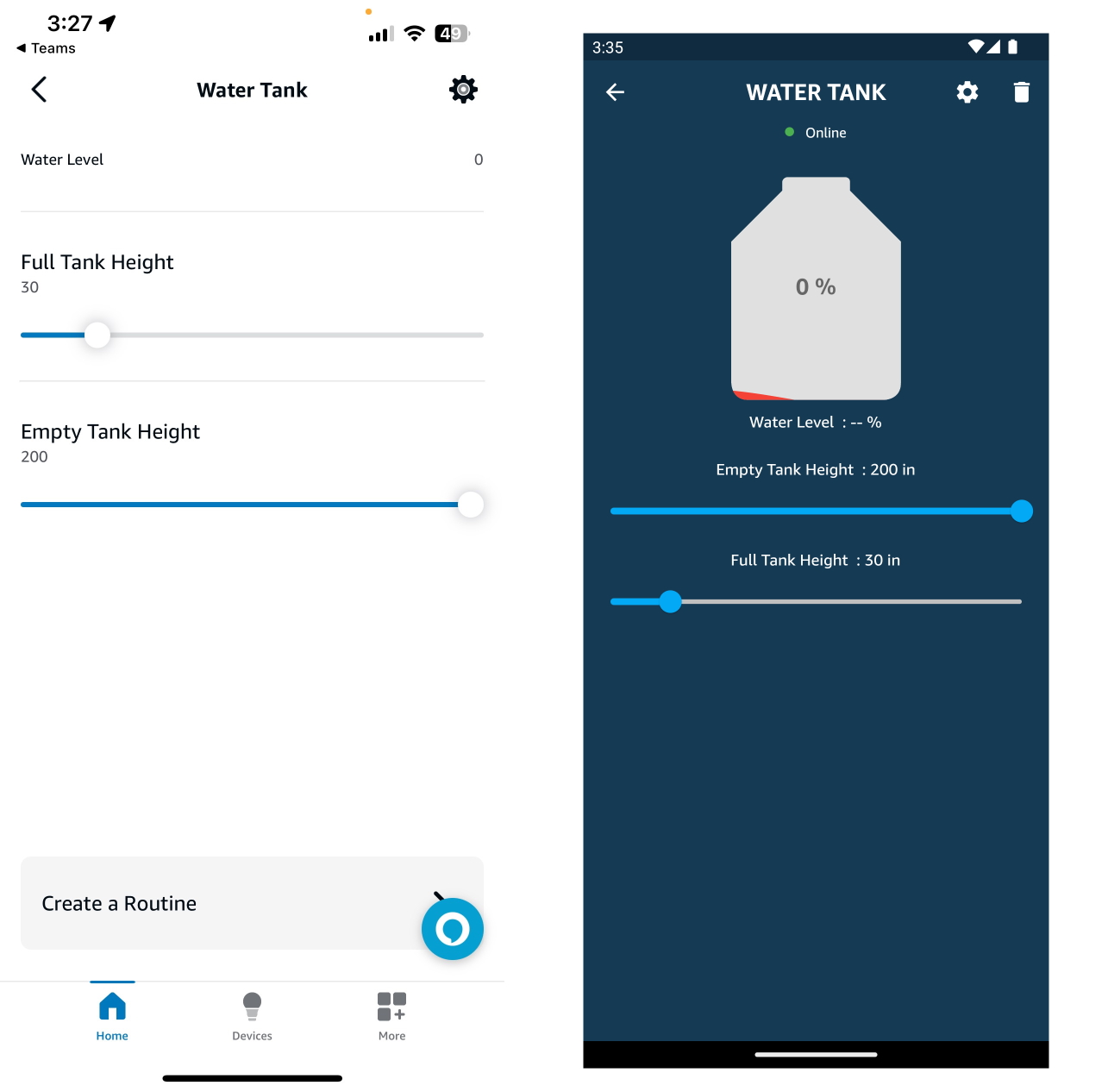
Tutto qui.
Risoluzione dei problemi
-
Google Home e SmartThings non sono supportati.
-
Per maggiori dettagli consulta la nostra pagina Risoluzione dei problemi.
Tutorial correlati
- Come controllare un ESP32 o ESP8266 con Alexa e Google Home
- Sensore di perdite d’acqua, allagamento e pioggia
- Sensore capacitivo di umidità del terreno (HW-390)
Questo documento è open source. Hai trovato un errore? Apri una issue