


SinricPro usa REST per la sua API. Questo significa che scambia i dati in formato JSON e segue le pratiche HTTP più comuni per la comunicazione.
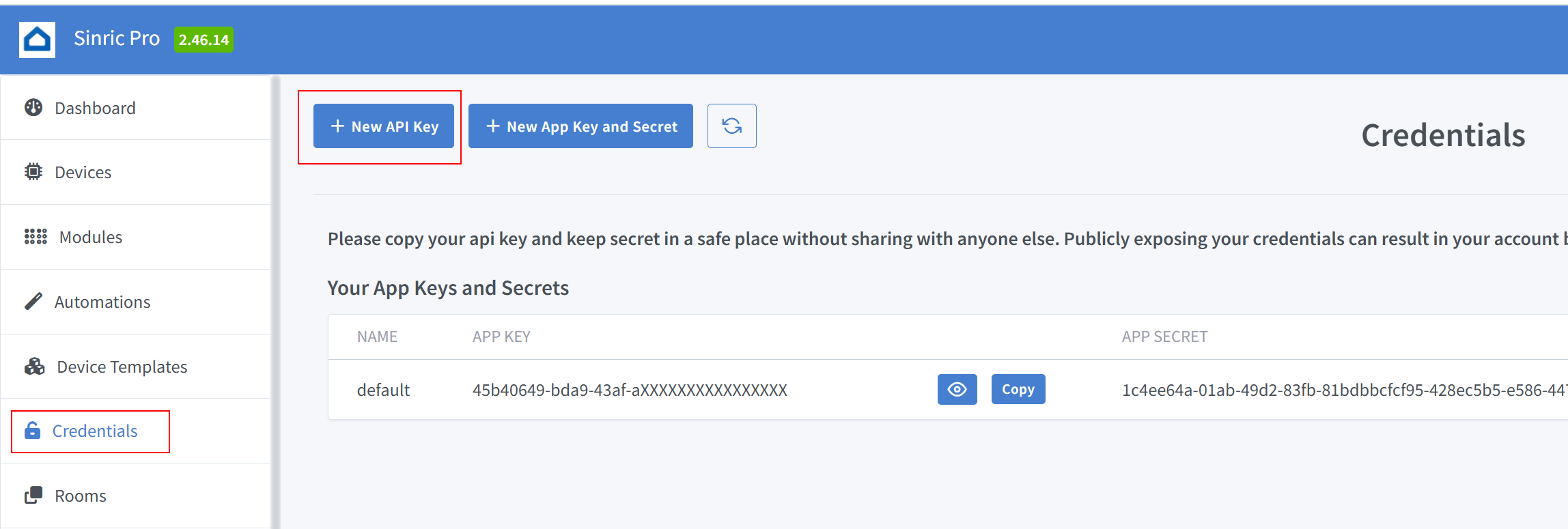
Per interagire con l’API di SinricPro ti serve una chiave API. Puoi creare e gestire le tue chiavi API nella Dashboard di SinricPro, nella sezione Credentials. Per creare una nuova chiave API fai clic qui
Richiesta
curl -H "X-SINRIC-API-KEY: {YOUR-API-KEY-HERE}" https://api.sinric.pro/api/v1/devices
Risposta
{
   "success":true,
   "devices":[{
      "name":"TV",
      ....
   }]
}
Richiesta
curl -H "X-SINRIC-API-KEY: {YOUR-API-KEY-HERE}" https://api.sinric.pro/api/v1/devices/{device_id}
Risposta
{
   "success":true,
   "device":{
      "name":"TV",
      ....
   }
}
Richiesta
curl --location 'https://api.sinric.pro/api/v1/devices/{device_id}/action' \
--header 'X-SINRIC-API-KEY: {YOUR-API-KEY-HERE}' \
--header 'Content-Type: application/json' \
--data '{ "type": "request", "action": "setPowerState", "value": "{\"state\":\"On\"}" }'
Nota: value è una stringa. Usa JSON.stringify()
Risposta
{
    "success": true,
    "message": "OK. Your message has been queued for processing."
}
SinricPro dà priorità alla velocità ed evita le operazioni bloccanti. Tutte le richieste di comando vengono messe in coda e gestite in modo asincrono, quindi la risposta potrebbe non essere immediata. Per ricevere una conferma o monitorare in modo continuo lo stato dei dispositivi, iscriviti agli aggiornamenti tramite il nostro endpoint SSE (Server-Sent Events).
curl -N --http2 -H "Accept:text/event-stream" -H "X-SINRIC-API-KEY: {YOUR-API-KEY-HERE}" https://sse.sinric.pro/sse/stream
Risposta
 % Total    % Received % Xferd  Average Speed   Time    Time     Time  Current
                                 Dload  Upload   Total   Spent    Left  Speed
  0     0    0     0    0     0      0      0 --:--:--  0:00:05 --:--:--     0
{"event":"deviceConnected","device":{"name":"lightbulb","id":"660a7edf061ee8c78078c5ab"}}
....
{"event":"deviceDisconnected","device":{"name":"switch2","id":"660a6c3d061ee8c78078bf3e"}}
...
{"event":"deviceMessageArrived","device": {"name":"switch2","id":"660a6c3d061ee8c78078bf3e","powerState":"On"}}
Richiesta
curl --location 'https://api.sinric.pro/api/v1/devices/{device_id}/action' \
--header 'X-SINRIC-API-KEY: {YOUR-API-KEY-HERE}' \
--header 'Content-Type: application/json' \
--data '{ "type": "request", "action": "setMode", "value": "{\"mode\":\"Open\"}" }'
Nota: value è una stringa. Usa JSON.stringify()
Richiesta
curl --location 'https://api.sinric.pro/api/v1/devices/{device_id}/action' \
--header 'X-SINRIC-API-KEY: {YOUR-API-KEY-HERE}' \
--header 'Content-Type: application/json' \
--data '{ "type": "request", "action": "setRangeValue", "value": "{\"rangeValue\": 100}" }'
Nota: value è una stringa. Usa JSON.stringify()
Richiesta
curl --location 'https://api.sinric.pro/api/v1/devices/{device_id}/action' \
--header 'X-SINRIC-API-KEY: {YOUR-API-KEY-HERE}' \
--header 'Content-Type: application/json' \
--data '{ "type": "request", "action": "DoorbellPress", "value": "{\"state\": \"pressed\"}" }'
Nota: value è una stringa. Usa JSON.stringify()
Nota: le capability come Range o Mode richiedono il parametro aggiuntivo instanceId
Richiesta Range
curl --location 'https://api.sinric.pro/api/v1/devices/{device_id}/action' \
--header 'X-SINRIC-API-KEY: {YOUR-API-KEY-HERE}' \
--header 'Content-Type: application/json' \
--data '{ "type": "request", "instanceId" : "rangeInstance1", "action": "setRangeValue", "value": "{\"rangeValue\":41}" }'
Richiesta Mode
curl --location 'https://api.sinric.pro/api/v1/devices/{device_id}/action' \
--header 'X-SINRIC-API-KEY: {YOUR-API-KEY-HERE}' \
--header 'Content-Type: application/json' \
--data '{ "type": "request", "instanceId" : "modeInstance1", "action": "setMode", "value": "{\"mode\":\"cool\"}" }'
Nota: value è una stringa. Usa JSON.stringify()
Richiesta
curl --location 'https://api.sinric.pro/api/v1/devicess/find' \
--header 'X-SINRIC-API-KEY: {YOUR-API-KEY-HERE}' \
--header 'Content-Type: application/json' \
--data '{ "name" : "TV" }'
Risposta
{ "success":true,"devices": [ {"name": "TV"} ] }
L’elenco completo degli endpoint dell’API è disponibile qui
Cerchi altri esempi?