


Local control lets the Sinric Pro app talk to your devices directly over your Wi-Fi, without going through the Sinric Pro cloud.
It matters in two situations:
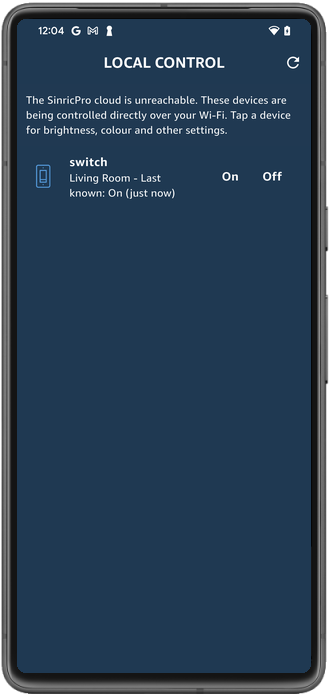
Local control is built into the SDK and is on by default. There is nothing to configure in the portal.
| SDK | Minimum version |
|---|---|
| Arduino (ESP8266 / ESP32 / RP2040) | 5.0.0 |
| ESP-IDF | 1.3.0 |
| Raspberry Pi Pico W (C SDK) | 2.0.0 |
| Python | 6.0.0 |
| Node.js | 6.0.0 |
| MicroPython | 3.0.0 |
You also need a recent Sinric Pro app, and the phone must be on the same Wi-Fi network as the device. Local control does not work over mobile data or from outside your home.
The app has to know which address a device is on before it can talk to it. It tries, in order:
_sinricpro._udp.local. on the network. This is
the quickest route and finds every device in one query.The result is cached, so discovery happens once rather than on every tap.
Commands go to UDP port 3333 on the device. The message is exactly the same signed envelope the cloud uses:
{
  "header":    { "payloadVersion": 2, "signatureVersion": 1 },
  "payload":   { "action": "setPowerState", "deviceId": "...", "value": { "state": "On" } },
  "signature": { "HMAC": "..." }
}
The device verifies the signature, runs the same callback it would run for a
cloud request, and replies to the phone. Your sketch does not change: a device
that handles onPowerState from Alexa handles it from the LAN too.
Local control is enabled by default. To disable it:
Arduino
#define SINRICPRO_NOMDNS // keep local control, drop the mDNS announcement
ESP-IDF — in menuconfig, under SinricPro:
CONFIG_SINRICPRO_ENABLE_LOCAL_CONTROL=n
Python
config = SinricProConfig(app_key=..., app_secret=..., local_control=False)
Node.js
await SinricPro.begin({ appKey: ..., appSecret: ..., localControl: false });
MicroPython
sinricpro.start(APP_KEY, APP_SECRET, local_control=False)
The app says “No devices found on this Wi-Fi network”
UDP: listening on port 3333 shortly after boot.It works, then stops after the router restarts
The device’s IP address probably changed. Open the Local Control screen and pull to refresh, or reserve a fixed address for the device in your router.
Commands are slow or intermittent
Give the device a few seconds after it boots. On ESP32 and ESP8266 the initial secure connection to the cloud competes with the radio, and local replies can be delayed until it settles.
mDNS never finds anything
This is common and not a fault. Plenty of home routers drop multicast traffic. The app falls back to a broadcast probe automatically, so discovery still works.