


How to Install the Sinric Pro Library (SinricPro.h) in Arduino IDE and PlatformIO
The Sinric Pro library (also called the Sinric Pro SDK) connects your ESP32, ESP8266 or Raspberry Pi Pico W (RP2040) to Sinric Pro. This page shows how to install it and how to fix the most common install errors.
The library is open source: github.com/sinricpro/esp8266-esp32-sdk
Install in Arduino IDE
- Open the Library Manager: Tools > Manage Libraries.
- Search for SinricPro and click Install.
- When Arduino IDE asks to install the dependencies, choose Install All. If it does not ask, install them the same way:
- ArduinoJson by Benoit Blanchon (version 7.0.3 or newer)
- WebSockets by Markus Sattler (version 2.4.0 or newer)
- Open an example: File > Examples > SinricPro.
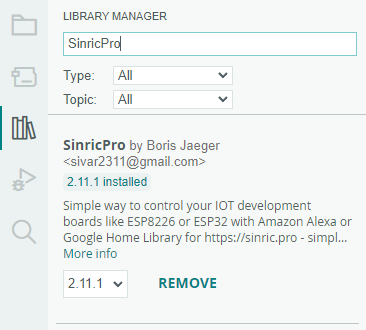
The library needs the board package (Arduino core) for your board to be installed as well: esp32, esp8266 or Raspberry Pi Pico/RP2040.
Install in PlatformIO (VS Code)
Add sinricpro/SinricPro to lib_deps in your platformio.ini. PlatformIO downloads the library and its dependencies on the next build.
[env:esp32dev]
platform = espressif32
board = esp32dev
framework = arduino
lib_deps = sinricpro/SinricPro

[env:nodemcuv2]
platform = espressif8266
board = nodemcuv2
framework = arduino
lib_deps = sinricpro/SinricPro
A complete platformio.ini is available here.
Download and install manually
- Download the latest release as a ZIP file from GitHub releases.
- In Arduino IDE choose Sketch > Include Library > Add .ZIP Library and select the file.
- Install ArduinoJson and WebSockets from the Library Manager.
Use the library in your sketch
#include <SinricPro.h>
#include <SinricProSwitch.h>
SinricPro.h is the main header. Each device type has its own header, for example SinricProSwitch.h, SinricProLight.h or SinricProTemperaturesensor.h. See the examples for every device type and the full SDK documentation.
For a complete first sketch, see How to control an ESP32 or ESP8266 with Alexa and Google Home.
Troubleshooting
fatal error: SinricPro.h: No such file or directory
The library is not installed for the IDE you are compiling with. Install SinricPro from the Library Manager (Arduino IDE) or add sinricpro/SinricPro to lib_deps (PlatformIO).
fatal error: ArduinoJson.h: No such file or directory or WebSocketsClient.h: No such file or directory
A dependency is missing. Install ArduinoJson (7.0.3 or newer) and WebSockets by Markus Sattler (2.4.0 or newer).
Compile errors after updating
Update ArduinoJson, WebSockets and the board package (Arduino core) to their latest versions. The library requires Arduino core 3.x.
For connection problems after the sketch is uploaded, see the Troubleshooting page.
Other SDKs
The Arduino library above supports ESP32, ESP8266 and RP2040. For other boards and languages:
- Raspberry Pi Pico SDK
- ESP-IDF SDK
- Arduino UNO R4 WiFi, Nano 33 IoT, MKR WIFI 1010, Seeedstudio Wio Terminal
- MicroPython SDK
- Python SDK
- NodeJS SDK
This document is open source. See a typo? Please create an issue